I guess I'm not the only one who gets confused with Docker networking. Let's try to understand it better!
Prerequisites
- Ubuntu 24.04
- Docker installed.
- Bridge Utils:
apt install bridge-utils -y
Bridge Network flow
I think I will only talk about this, since this is default network in docker.
Let's get started:
docker run -d -p 8888:80 --name nginx-demo nginx
Expected output:
root@kienlt-lab-utilities:~# docker ps
CONTAINER ID   IMAGE          COMMAND                  CREATED         STATUS         PORTS                                                    NAMES
67b80460a739   nginx          "/docker-entrypoint.…"   2 seconds ago   Up 2 seconds   0.0.0.0:8888->80/tcp, [::]:8888->80/tcp                  nginx-demo
Haha, I was having a hard time to understand which is container port and which is host port. But it is pretty simple, you just need to remember that the format is host_port:container_port, it means you will access nginx container from outside of the container using host_port, and inside the container, the nginx is running on container_port.
TLDR: if we have request access to port 8888, docker will throw that damn request to port 80 inside the container.
Verify by this command below:
root@kienlt-lab-utilities:~# docker port nginx-demo
80/tcp -> 0.0.0.0:8888
80/tcp -> [::]:8888
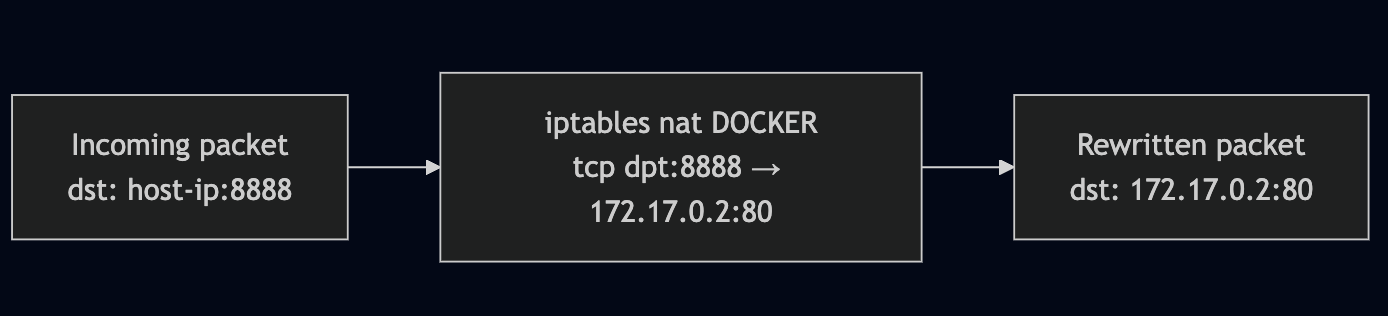
Why request from port 8888 can be forwarded to port 80 inside the heck container? It is iptables, hmm I thought it was used only for drop/accept like a firewall. But it is not, it can be used for port forwarding too. Let's check the iptables rules:
# To view full rule of Docker, remove that grep.
root@kienlt-lab-utilities:~# iptables -t nat -L DOCKER -n|grep 8888
DNAT       6    --  0.0.0.0/0            0.0.0.0/0            tcp dpt:8888 to:172.17.0.2:80
Let's break down the rule above:
- DNAT: Destination Network Address Translation
- 6: protocol (tcp)
- 0.0.0.0/0: source ip (any ip)
- 0.0.0.0/0: destination ip (any ip)
- tcp dpt:8888: destination port (8888)
- to:172.17.0.2:80: destination ip and port (172.17.0.2:80)
Hmm, where is the ip 172.17.0.2 comes from?
root@kienlt-lab-utilities:~# docker inspect -f '{{range .NetworkSettings.Networks}}{{.IPAddress}}{{end}}' nginx-demo
172.17.0.2
Flow summary:
- User sends request to:
http://host-ip:8888 - Host kernel receives the packet, sees destination port 8888
- iptables DNAT rule rewrites destination to
172.17.0.2:80 - The packet is forwarded to docker0 bridge
- Packet travels through a
veth pairinto the container's network namespace - nginx receives it on port 80
Hmmm, how Bridge (docker0) and veth works?
Before running any commands, here's the full picture of what we're about to explore:
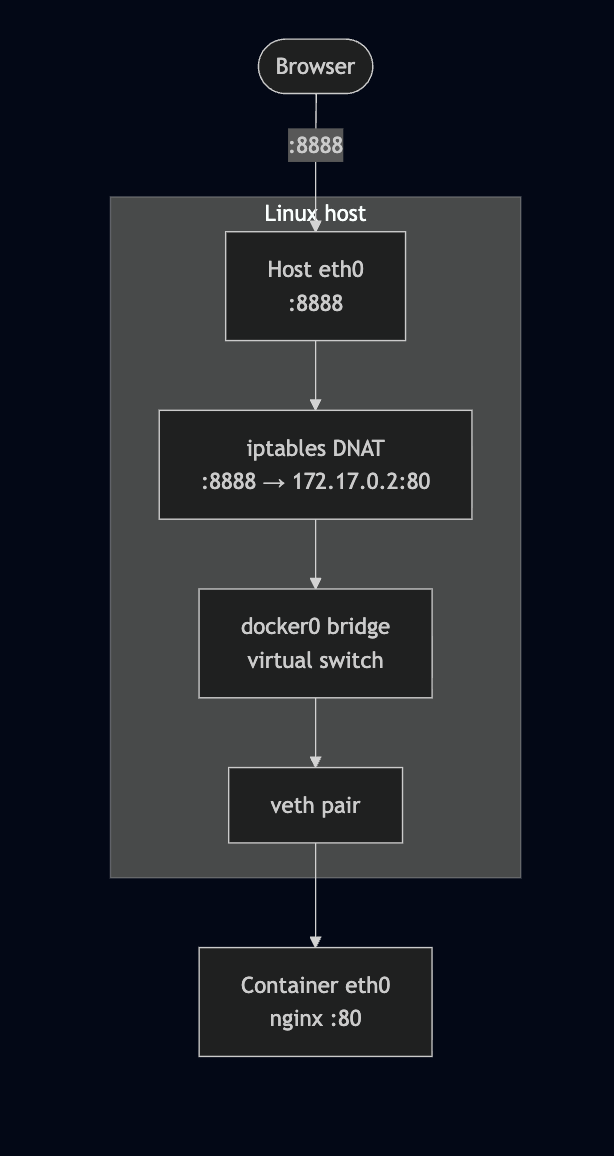
What is veth? It is a virtual ethernet pair, it is like a tunnel between two network namespaces.
What is Network Namespace (netns)? It is a feature of Linux kernel that allows you to create isolated network environments.
There are 3 keys component that need to be understood:
docker0: virtual bridgeveth pair: 2 way tunnel, 1 plugged into docker0, 1 plugged into containerNetwork Namespace: the reason why container have it's owneth0interface, complete isolated with host network
Verifying the Bridge and veth Pairs
We mentioned docker0, let's check it. (I have more than 1 container running, so you probably see more than 1 veth)
root@kienlt-lab-utilities:~# brctl show
bridge name         bridge id           STP enabled interfaces
br-2a065d00678a     8000.7687adb1e805   no          vethf6114a2
br-bf86e395575b     8000.72f5de7a4fae   no          vethfc36c96
br-c1027faa9820     8000.6a557a38506a   no          veth11ad843
docker0             8000.fa5bcf9b5087   no          veth37c4b71
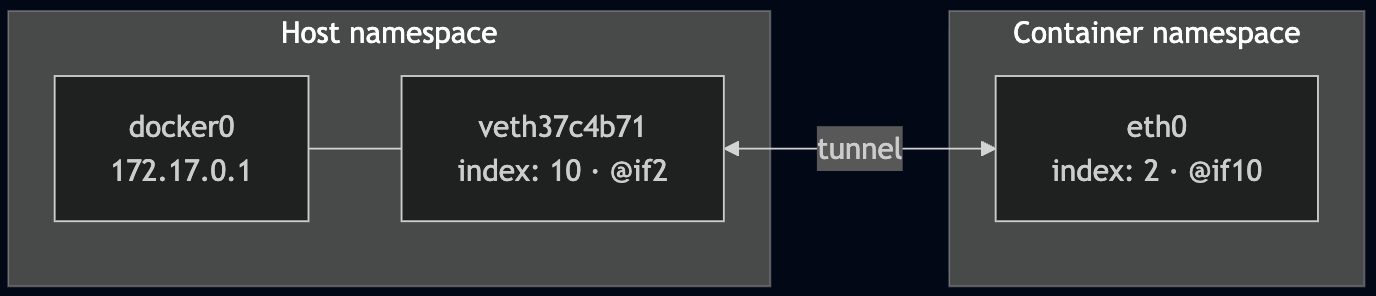
veth37c4b71 is the host-side end of the tunnel connected to our container.
Let confirms with ip link
root@kienlt-lab-utilities:~# ip link show master docker0
10: veth37c4b71@if2: <BROADCAST,MULTICAST,UP,LOWER_UP> mtu 1500 qdisc noqueue master docker0 state UP mode DEFAULT group default
    link/ether 3a:e0:83:b9:4e:7b brd ff:ff:ff:ff:ff:ff link-netnsid 3
Notice veth37c4b71@if2 — the @if2 means this interface is paired with interface index 2 on the other side (inside the container).
Network Namespaces (netns)
Each container runs in its own network namespace. Let's inspect it to confirm the veth pairing.
We can list all netns with ip netns list
root@kienlt-lab-utilities:~# ip netns list
root@kienlt-lab-utilities:~#
"Why are you lying? there is no netns here?" Don't worry bro, I will explain why!
root@kienlt-lab-utilities:~# man ip-netns
You will see a section like this, I'm showing from manual page, so no need external link xD
       ip netns list - show all of the named network namespaces

              This command displays all of the network namespaces in /run/netns
Ok, let's check in /run/netns and /var/run/netns. Wait a minute? why /var/run/netns, in man page haven't mentioned it?
Here you go bro, in Ubuntu /var/run is a link that pointed to /run
root@kienlt-lab-utilities:~# ll  /var/run
lrwxrwxrwx 1 root root 4 Feb 17  2025 /var/run -> /run/
root@kienlt-lab-utilities:~# ll /run/netns
ls: cannot access '/run/netns': No such file or directory
root@kienlt-lab-utilities:~# ll /var/run/netns
ls: cannot access '/var/run/netns': No such file or directory
To make it show properly in there, we will need to do some trick, why trick? This is only for learning purpose, in facts Docker doesn't expose netns to /run/netns due security.
# 1. Find PID of container
PID=$(docker inspect -f '{{.State.Pid}}' nginx-demo)

# 2. Create netns directory because it is not exists
sudo mkdir -p /var/run/netns

# 3. Soft link namespace of container to /var/run/netns
sudo ln -sf /proc/$PID/ns/net /var/run/netns/nginx-demo-ns

# 4. Check again - Now it will show up!
ip netns list
## expected output
nginx-demo-ns (id: 3)
##
Look inside the container's network namespace
Check veth pairing
root@kienlt-lab-utilities:~# sudo ip netns exec nginx-demo-ns ip link show eth0
2: eth0@if10: <BROADCAST,MULTICAST,UP,LOWER_UP> mtu 1500 qdisc noqueue state UP mode DEFAULT group default
    link/ether 42:17:5a:54:f2:c4 brd ff:ff:ff:ff:ff:ff link-netnsid 0
Important output: eth0@if10, if10 is the other side of the veth pair, it is connected to docker0 bridge. So let see all network interface in Host, who the fuck has index 10?
I want to prove: eth0 inside container is paired with veth37c4b71 outside, network host.
root@kienlt-lab-utilities:~# ip link | grep ^10:
10: veth37c4b71@if2: <BROADCAST,MULTICAST,UP,LOWER_UP> mtu 1500 qdisc noqueue master docker0 state UP mode DEFAULT group default
Hmm, it is veth37c4b71 and you see master docker0 which means it is plugged into the docker0 bridge. Ok what is @if2 in veth37c4b71@if2? I would type this command again to prove it is linked with each other.
root@kienlt-lab-utilities:~# sudo ip netns exec nginx-demo-ns ip link show eth0
2: eth0@if10: <BROADCAST,MULTICAST,UP,LOWER_UP> mtu 1500 qdisc noqueue state UP mode DEFAULT group default
    link/ether 42:17:5a:54:f2:c4 brd ff:ff:ff:ff:ff:ff link-netnsid 0
You see index 10 (if10)? It is the other side of the veth pair.
Hmm, let me tell you what is interface index
root@kienlt-lab-utilities:~# ip link
1: lo: <LOOPBACK,UP,LOWER_UP> mtu 65536 qdisc noqueue state UNKNOWN mode DEFAULT group default qlen 1000
    link/loopback 00:00:00:00:00:00 brd 00:00:00:00:00:00
2: eth0: <BROADCAST,MULTICAST,UP,LOWER_UP> mtu 1500 qdisc mq state UP mode DEFAULT group default qlen 1000
    link/ether fa:16:3e:36:85:01 brd ff:ff:ff:ff:ff:ff
    altname enp0s3
    altname ens3
3: docker0: <BROADCAST,MULTICAST,UP,LOWER_UP> mtu 1500 qdisc noqueue state UP mode DEFAULT group default
    link/ether fa:5b:cf:9b:50:87 brd ff:ff:ff:ff:ff:ff
4: br-c1027faa9820: <BROADCAST,MULTICAST,UP,LOWER_UP> mtu 1500 qdisc noqueue state UP mode DEFAULT group default
    link/ether 6a:55:7a:38:50:6a brd ff:ff:ff:ff:ff:ff
5: veth11ad843@if2: <BROADCAST,MULTICAST,UP,LOWER_UP> mtu 1500 qdisc noqueue master br-c1027faa9820 state UP mode DEFAULT group default
    link/ether ee:e7:24:2f:ca:b5 brd ff:ff:ff:ff:ff:ff link-netnsid 0
6: br-2a065d00678a: <BROADCAST,MULTICAST,UP,LOWER_UP> mtu 1500 qdisc noqueue state UP mode DEFAULT group default
    link/ether 76:87:ad:b1:e8:05 brd ff:ff:ff:ff:ff:ff
7: vethf6114a2@if2: <BROADCAST,MULTICAST,UP,LOWER_UP> mtu 1500 qdisc noqueue master br-2a065d00678a state UP mode DEFAULT group default
    link/ether ea:85:60:ef:33:a4 brd ff:ff:ff:ff:ff:ff link-netnsid 1
8: br-bf86e395575b: <BROADCAST,MULTICAST,UP,LOWER_UP> mtu 1500 qdisc noqueue state UP mode DEFAULT group default
    link/ether 72:f5:de:7a:4f:ae brd ff:ff:ff:ff:ff:ff
9: vethfc36c96@if2: <BROADCAST,MULTICAST,UP,LOWER_UP> mtu 1500 qdisc noqueue master br-bf86e395575b state UP mode DEFAULT group default
    link/ether 5e:e7:47:ac:9c:a2 brd ff:ff:ff:ff:ff:ff link-netnsid 2
10: veth37c4b71@if2: <BROADCAST,MULTICAST,UP,LOWER_UP> mtu 1500 qdisc noqueue master docker0 state UP mode DEFAULT group default
    link/ether 3a:e0:83:b9:4e:7b brd ff:ff:ff:ff:ff:ff link-netns nginx-demo-ns
so inside container, interface eth0 is linked with veth37c4b71@if2 which have interface index is 10. And veth37c4b71@if2 is linked with docker0 bridge.
Visualizing the pairing
You can use this command to see it more clearly
root@kienlt-lab-utilities:~# ip netns exec nginx-demo-ns ethtool -S eth0
NIC statistics:
     peer_ifindex: 10 # This is 10th interface in host
     ...

# Run this shit
root@kienlt-lab-utilities:~# ethtool -S veth37c4b71
NIC statistics:
     peer_ifindex: 2 # This is 2nd interface in container
     ...
Why we need this fucking veth pair? Because Network Namespace is isolated, so we need a tunnel to connect them.
Conclusion
I hope this post help you understand how docker networking works.