1.Intro
Ah shit, here we go again xD. This time is Google Cloud, my first time. Please prepare new trial account with 300$, we will use it for 3 months in a row. Not sure I can do what I'm aiming for (Cloud Engineer Associate + DevOps Pro). In this article, I'm mainly using resource from Udemy course and visit Associate Cloud Engineer link for me information!
Useful links:
Section of the exam:
- Section 1: Setting up a cloud solution environment (~20% of the exam)
- Section 2: Planning and configuring a cloud solution (~10% of the exam)
- Section 3: Deploying and implementing a cloud solution (~30% of the exam)
- Section 4: Ensuring successful operation of a cloud solution (~30% of the exam)
- Section 5: Configuring access and security (~10% of the exam)
Update: My goal changed, so no more cloud certifications for this year.
2.Resource Hierarchy
Concept of project in GCP
A project is the main container for all your resources. (Ref: ResourceGroup at Azure)
Key project identifiers (Classic ACE exam traps!):
- Project Name: User-friendly, mutable (change anytime), doesn't need to be globally unique.
- Project ID: User-chosen (or auto-gen), globally unique, IMMUTABLE (can NEVER be changed once created). Used heavily in
gcloudand APIs. - Project Number: Google-assigned digits, immutable, globally unique. You will often see it prefixing default service accounts (e.g.
[project-number]-compute@developer.gserviceaccount.com).
Accidental deletion protection:
- Deleting a project enters a 30-day pending deletion window (soft delete). Can be restored within 30 days via
gcloud projects undelete <PROJECT_ID>. - To completely prevent accidental deletion (even from project owners), place a Project Lien on it (
resourcemanager.projects.updateLiens). You must remove the lien before anyone can delete the project.
Resource Hierarchy
Same like Azure, pretty familiar xD. Permissions management in GCP work with mechanism inheritance. GCP Resource Hierarchy has 4 levels: Organization, Folders, Projects and Resources.

Important rules for the exam:
- Inheritance is additive (Union, NOT intersection): Flow goes downward (Org -> Folder -> Project -> Resource). If a user has
Viewerat Folder level, you CANNOT restrict or revoke that permission at the Project level. Child nodes can only grant additional permissions, never restrict inherited ones. - Folders require an Organization node: You cannot create folders without an Org (e.g. personal trial accounts without Cloud Identity / Google Workspace cannot use folders).
Manage Projects
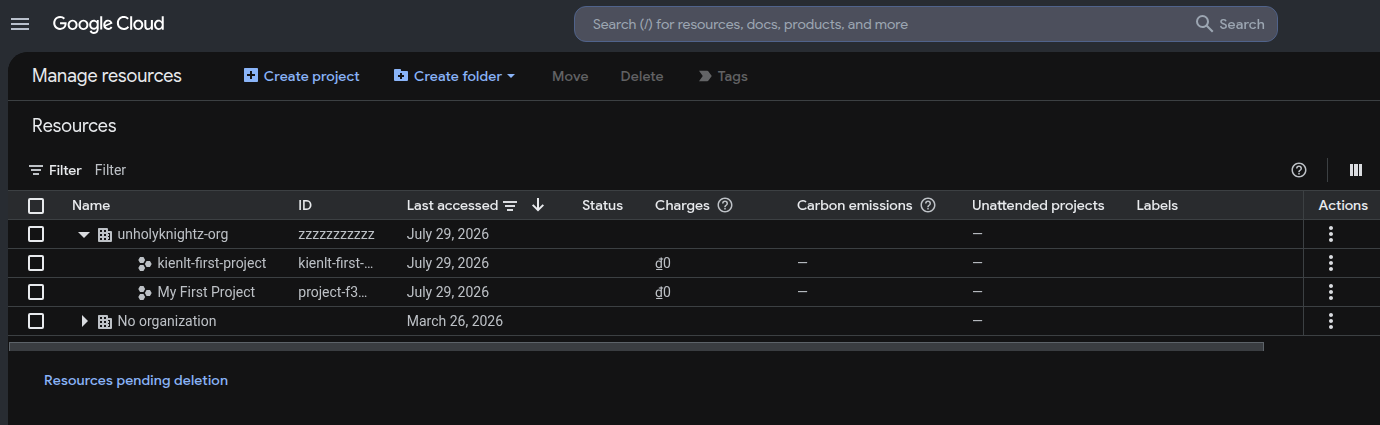
We can use this for tracking costs of specific project like this
Organization Policies VS IAM
Nothing new for me, no need to explain detailed:
- Org Policies: WHAT can be done (Example: Edit/Create a policy for resource location lock, only allow to create instance in specific location like es-east1/europe-west1.)
- IAM: WHO can do something.
API
For some services, we need to enable before use it!
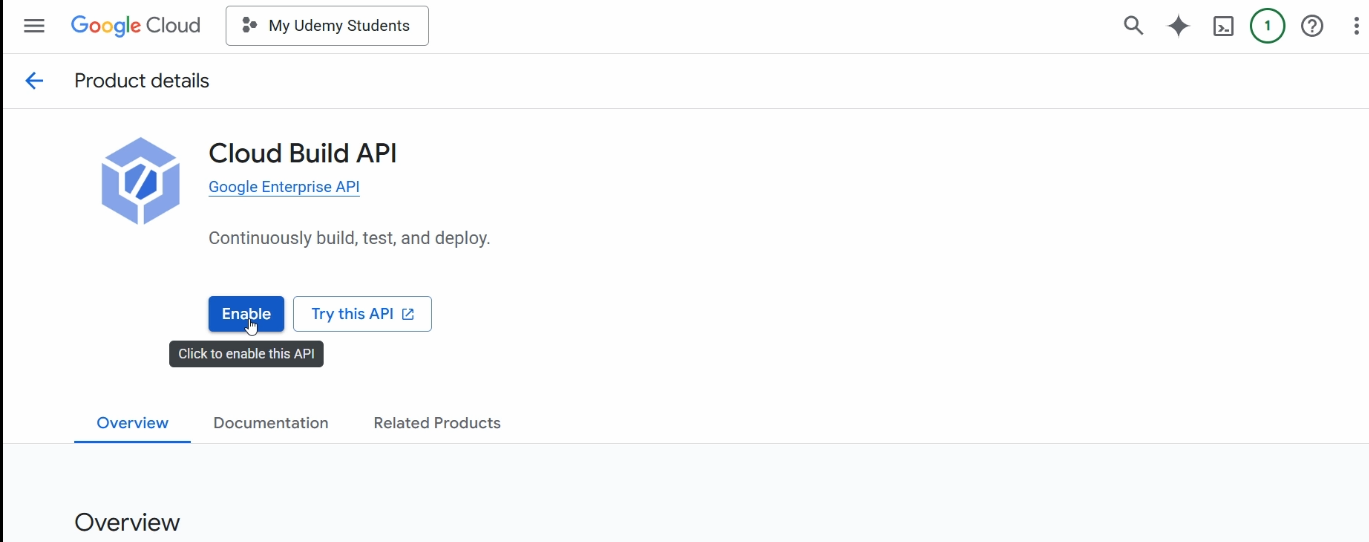
Enable via CLI: gcloud services enable compute.googleapis.com
Cloud Identity
WHO is the people that allow to do WHAT
- Cloud Identity: Manages the "WHO"
- IAM: Manages the "WHAT"
Best practice is manage people with group for sure, not only in GCP. For example in Elasticsearch, we create a role called data-reader that has permission to read indices kienlt-data-*, then we add right user to that role, so we don't need to create multiple role for each user or remove user from that role when they are no longer needed, pretty common practice I believe!
Asset Inventory
Inventory of everything in your GCP. Is the central catalog for every single resource in your GCP Org.
I remember when my boss ask me to create inventory of whole system on-premises, it would take shit load of time... But in GCP, there are already service for this shit!
Cloud Billing Account
A single billing account can pay for thoudsands of projects, centralizing financial control. And need to remember that billing accounts are "Separate" from projects in GCP (to use paid service, a project must be linked to an active cloud billing account so Google know where to send the fuckin' bill!)
Exam traps to remember:
- Roles to link Billing to a Project: Requires
Billing Account Useron the billing account +Project Billing Manager(roles/billing.projectManager, or Project Owner) on the target project. (Project Creatoronly creates new projects under Org/Folders; it cannot link billing to an existing project!). - Budget alerts DO NOT stop resources: Setting a budget with 50%/90%/100% alerts only sends notifications (Email or Pub/Sub). It will never automatically shut down VMs or stop spending by itself. If you want automated cost capping, export budget alerts to a Pub/Sub topic and trigger a Cloud Function/Run to disable billing or delete resources.
Cost Optimization: CUD vs SUD (Exam Staple!)
- Committed Use Discounts (CUD): 1-year or 3-year contractual commitment for steady-state workloads (up to 57% - 70% discount). Resource-based (vCPU/RAM) or Spend-based ($/hr commitment).
- Sustained Use Discounts (SUD): Automatic discount (up to 30%) applied when running certain Compute Engine VM types (e.g. N1, N2) for more than 25% of a billing month. No upfront commitment needed!
Quota Management
- Rate Quotas: Resets after a time interval (e.g. 60 requests/minute to an API).
- Allocation Quotas: Maximum concurrent resources in a project/region (e.g. max 24 vCPUs or 5 static external IPs).
- Requesting Increase: Go to IAM & Admin -> Quotas, select the quota, and click Edit Quotas (requires business justification; approved automatically or reviewed by Google).
Ofc, like other public cloud providers, you are able to view the cost with labels...
Other shit
- We can setting billing exports to BigQuery to analyze the costs!
- Managing multiple
gcloudenvironments / projects:gcloud config set project <PROJECT_ID>gcloud config configurations create <NAME>&gcloud config configurations activate <NAME>(favorite exam topic for switching between dev, staging, and prod profiles without re-authenticating each time).
3. IAM
Just little more detail of Cloud Identity I told above!
Role Types (Classic Exam Topic)
- Primitive / Basic Roles:
Viewer,Editor,Owner. Broad and legacy. Never use in production!Owner: Full control + billing + project deletion + member management.Editor: Deploy/modify resources, but cannot manage members or billing.Viewer: Read-only.
- Predefined Roles: Fine-grained, managed and maintained by Google (e.g.
roles/compute.instanceAdmin.v1,roles/storage.objectViewer). Recommended default! - Custom Roles: User-tailored set of granular permissions when predefined roles are too broad.
- Exam Trap: Custom roles can ONLY be created at Organization or Project levels (CANNOT be created at Folder level, nor defined on individual resources!).
- They do NOT auto-update when Google introduces new service permissions.
Service Accounts (Both Identity and Resource!)
A Service Account (SA) has a dual nature:
- As an Identity: You grant the SA permissions to talk to other GCP resources (e.g. read GCS bucket).
- As a Resource: You grant human users permissions on the SA itself!
The serviceAccountUser vs serviceAccountTokenCreator Trap (Exam favorite):
- Attaching to resources (
actAs): If a developer needs to deploy a Compute Engine VM or Cloud Run service running under a Service Account, they needroles/iam.serviceAccountUser(iam.serviceAccounts.actAs) granted ON that Service Account. Without it, GCP throws a permission denied error when launching the VM. - Direct Impersonation: If a developer needs to directly impersonate an SA (e.g.
gcloud ... --impersonate-service-accountor generate short-lived tokens via API), they needroles/iam.serviceAccountTokenCreator, NOTserviceAccountUser!
Default Service Account Risks:
- Compute Engine creates a default SA:
<project-number>-compute@developer.gserviceaccount.com. - Legacy behavior vs Modern Org Policy: Historically, it was automatically granted the primitive
Editorrole (a massive security hazard). Note that for organizations created after May 3, 2024, Google enforces the Org Policy constraintiam.automaticIamGrantsForDefaultServiceAccountsby default, disabling this automatic grant. However, in exam questions and older environments, this automaticEditorgrant is still treated as a classic security trap! - Best practice / Exam answer: Disable or avoid using default service accounts; create a dedicated custom SA with least privilege.
Impersonate
GCP IAM Impersonation example, impersonate GCP Service Account to test permission read storage. So you don't need to use serviceAccount Key (More fuckin' secure!)
gcloud storage ls gs://my-company-bucket \
  --impersonate-service-account=app-reader@my-project.iam.gserviceaccount.com
You feel like familiar with something in K8S? right? Yes, exactly! It is fuckin' serviceAccount in K8S. Example test serviceAccount developer-sa in namespace dev if it is able to get pods!
kubectl get pods -n dev --as=system:serviceaccount:dev:developer-sa
Service Account Keys vs Short-Lived Credentials
- Avoid user-managed keys (
.jsonkey files). They can be leaked, committed to Git, and are painful to rotate. - Best alternatives:
- VM / Cloud Run / GCF: Attach SA directly to resource instance metadata.
- GKE: Workload Identity Federation.
- Local dev / testing:
gcloud auth application-default loginor IAM Impersonation (roles/iam.serviceAccountTokenCreator).
Fine-grained accounts
Format:
[app-name]-[env]-[purpose]-sa
And yes, fuckin' Least privileges please!
IAM Conditions
Allow conditional role bindings based on attributes (e.g. resource name prefix, current time, or IP address):
- Example: Grant access to Cloud Storage only if bucket name starts with
gs://dev-*, or temporary access that expires automatically at a specific date/time.
Workload vs Workforce Identity Federation
- Workforce: for human (e.g. login via Microsoft Entra ID / Okta for employees).
- Workload: for machine (e.g. GitHub Actions, AWS/Azure workloads calling GCP APIs without service account keys).
Useful gcloud IAM Commands
# Add IAM binding to a project
gcloud projects add-iam-policy-binding <PROJECT_ID> \
  --member="user:dev@example.com" \
  --role="roles/storage.objectViewer"

# Create a custom service account
gcloud iam service-accounts create my-app-sa \
  --display-name="My App SA"

# Grant a developer permission to use/attach that SA to VMs
gcloud iam service-accounts add-iam-policy-binding my-app-sa@<PROJECT_ID>.iam.gserviceaccount.com \
  --member="user:dev@example.com" \
  --role="roles/iam.serviceAccountUser"
4. Compute & Scaling
VM Access
We can login with IAM instead of SSH or User/Password. Actually behind the scene, GCP did many many thing it in:
- OS Login
- Guest agent functionality
- Github Guest Os Login
- Identity-Aware Proxy (IAP) TCP forwarding: Enables secure SSH/RDP to VM instances over private internal IPs without needing public IP addresses or bastion/jump hosts.
- Short-Lived SSH Certificates: When using OS Login with 2FA or certificate authentication, Google Cloud issues ephemeral SSH certificates valid for only 5 minutes (300 seconds), eliminating long-lived SSH key sprawl.
Default Google-provided OS images already included the Guest Agent and OS Login packages come pre-installed and pre-configured. So we don't need to install them manually xD.
The OS Login Package provides the actual binaries and Linux modules that communicate with GCP (detail in Github above):
- Authorized Keys Command
- NSS Modules
- PAM(Pluggable Authentication Modules) Modules: You will like me feel like the last word "Modules" is little duplicate, but actually they are widely used. For example: ATM machine -> Automated Teller Machine machine, PDF format -> Portable Document Format format, SQL language -> Structured Query Language language. That is how we talk in common of software engineering I guess xD
Managed Instance Group (MIG)
Almost same as AWS Auto Scaling Group (ASG), but keep in mind these GCP-specific gotchas:
- Instance Templates are IMMUTABLE: You cannot edit them in-place; you must create a new version or copy from an existing one.
- Auto-healing: Requires a dedicated application health check (separate from the LB health check) to detect and recreate unhealthy VMs.
- Stateful MIG: Preserves attached persistent disks and static IPs across VM recreations (useful for stateful workloads like Kafka/DB replicas).
GCP Compute Quirks & Exam Traps
- Spot vs Preemptible: Spot VMs have NO 24-hour limit (legacy Preemptible strictly died after 24h). Both have a 30-second termination notice.
- Live Migration: Default behavior during host maintenance is live migration with zero downtime. Exception: GPU instances cannot live-migrate (
OnHostMaintenance=TERMINATE). - Persistent Disk (PD) Types:
pd-standard(HDD): Low cost, large sequential I/O, backup targets.pd-balanced(SSD): General-purpose balanced price/performance (default for many VMs).pd-ssd(SSD): High performance, high IOPS/low latency for production databases.pd-extreme/Hyperdisk: Ultra-high throughput and IOPS (dynamically configurable independent of disk size) for mission-critical enterprise workloads (SAP HANA, high-end Oracle).
- Persistent Disk multi-attach: Standard and SSD PDs can be attached to multiple VMs simultaneously in
ReadOnlymode. - Online disk expansion: Disks can be grown online without downtime, but can never be shrunk.
- Scopes vs IAM: Modern best practice is
--scopes=cloud-platformon the VM, controlling actual permissions strictly via the assigned Service Account.
Other shit
- Create Patch Deployment for patch management of fleet of computer engine, that will generate patch jobs
5. Google Kubernetes Engine (GKE)
This one worth to mention since this is new for me.
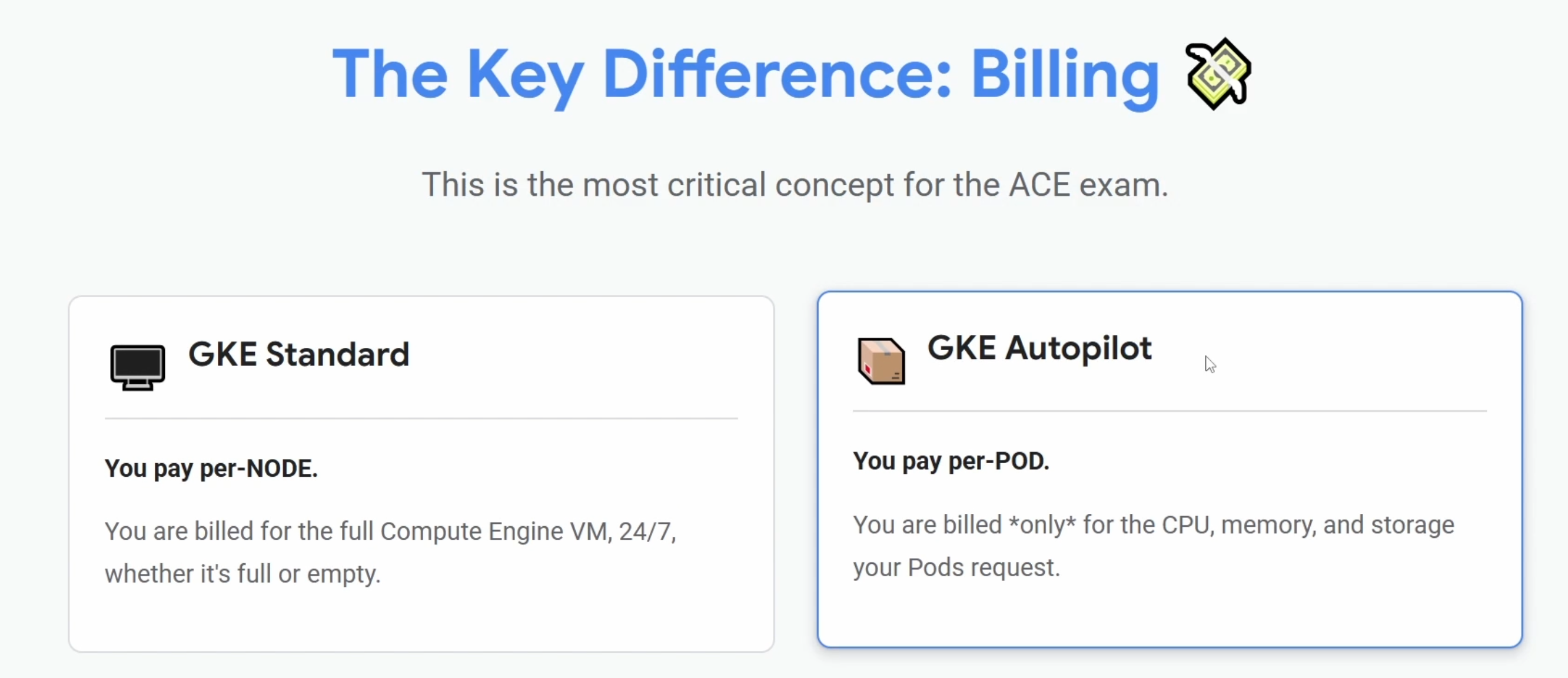
And yes, we have same thing in Azure + AWS:
- Azure: Azure Container Apps or AKS Automatic
- AWS: AWS Fargate (cho EKS / ECS)
Cluster Types: Zonal vs Regional (Exam Trap)
- Zonal: Single control plane in 1 zone. Control plane upgrades cause temporary API downtime (running workloads unaffected).
- Regional: Control plane replicated across 3 zones; node pools can span across multiple zones in the region (default is 3 nodes/zone = 9 nodes in default standard pool, but can be customized). Zero downtime during control plane upgrades. Higher SLA.
- Exam trap: Cluster location type is strictly immutable in BOTH directions — you CANNOT convert Zonal to Regional, nor Regional to Zonal (must spin up a new cluster and migrate workloads).
Standard vs Autopilot
- Standard: Full control over node pools, OS, and machine types. Pay per VM instance.
- Autopilot: Fully managed nodes. Pay strictly per Pod resource requests (vCPU/RAM). SSH to nodes and privileged containers are disabled by default.
Node Pool Machine Type Upgrades
- You cannot modify the machine type of an existing node pool.
- Migration pattern: Create a new node pool with target machine type -> Cordon & Drain old node pool (
kubectl drain) -> Delete the old node pool.
Security & Connectivity
- Private Cluster: Nodes have NO public IPs (requires Cloud NAT for outbound internet).
- Master Authorized Networks: Restrict which specific CIDRs can access the K8s API server endpoint.
- Fetch credentials:
gcloud container clusters get-credentials <NAME> --region=<REGION>
Cluster Autoscaling
- Scales node pools based on pending (unschedulable) pod resource requests, NOT node CPU/memory utilization.
Workload Identity
The recommended, secure way for GKE pods to access GCP services without keys (Equivalent to AWS IRSA).
- Bind a Kubernetes Service Account (KSA) to a Google Cloud Service Account (GSA) with
roles/iam.workloadIdentityUser. - The GKE metadata server automatically exchanges the KSA token for short-lived Google Cloud credentials.
Backup for GKE
- Fully managed service to protect, backup, and restore application workloads (K8s manifests/configurations) and persistent volume data in GKE clusters.
6. Serverless with Cloud Run
Cloud run services (Serverless containers)
- GCP: Cloud Run
- AWS: Fargate or App Runner
- Azure: Azure Container Apps / App Service Container
Cloud run function (Serverless functions)
- GCP: Cloud Run Functions
- AWS: Lambda
- Azure: Azure Functions
Event Trigger for function
- GCP: Eventarc or Pub/Sub
- AWS: EventBridge
- Azure: Azure Event Grid
Example with Eventarc
This is fuckin' popular example that would appear in every tutorial, LOL. When user upload an image to Cloud Storage Bucket (S3), Eventarc will catch this event and trigger Cloud Run Function to handle (resize image, extract metadata of image and write to somewhere?)
Another example would to mention: Pub/Sub will related to decoupling services (using Eventarc). Also remember, there is no fuckin' persistant data in Cloud Run Service (But mount NFS or publish data to Cloud Storage are fine xD)
Concurrency (Differs from AWS Lambda)
- In Lambda: 1 invocation = 1 container.
- In Cloud Run: 1 container handles multiple concurrent requests (up to 1,000, default 80). Set
--concurrency=1only if your app cannot handle multi-threading/concurrency.
App Engine: Standard vs Flexible (Legacy Exam Favorite)
- Standard: Pre-configured sandboxes, scales to zero instantly, fast startup (ms), no Docker customizations, cannot write to local disk.
- Flexible: Runs on GCE VMs inside custom Docker containers. Supports any runtime, can write to disk, can SSH, but cannot scale to zero (min 1 VM, slower boot, more expensive).
7. Cloud Storage
Storage Classes
Bucket name must be globally unique. We have some storage classes like others but almost just name different, LOL:
- Standard (Hot)
- Nearline (Warm)
- Coldline (Cool)
- Archive (Cold)
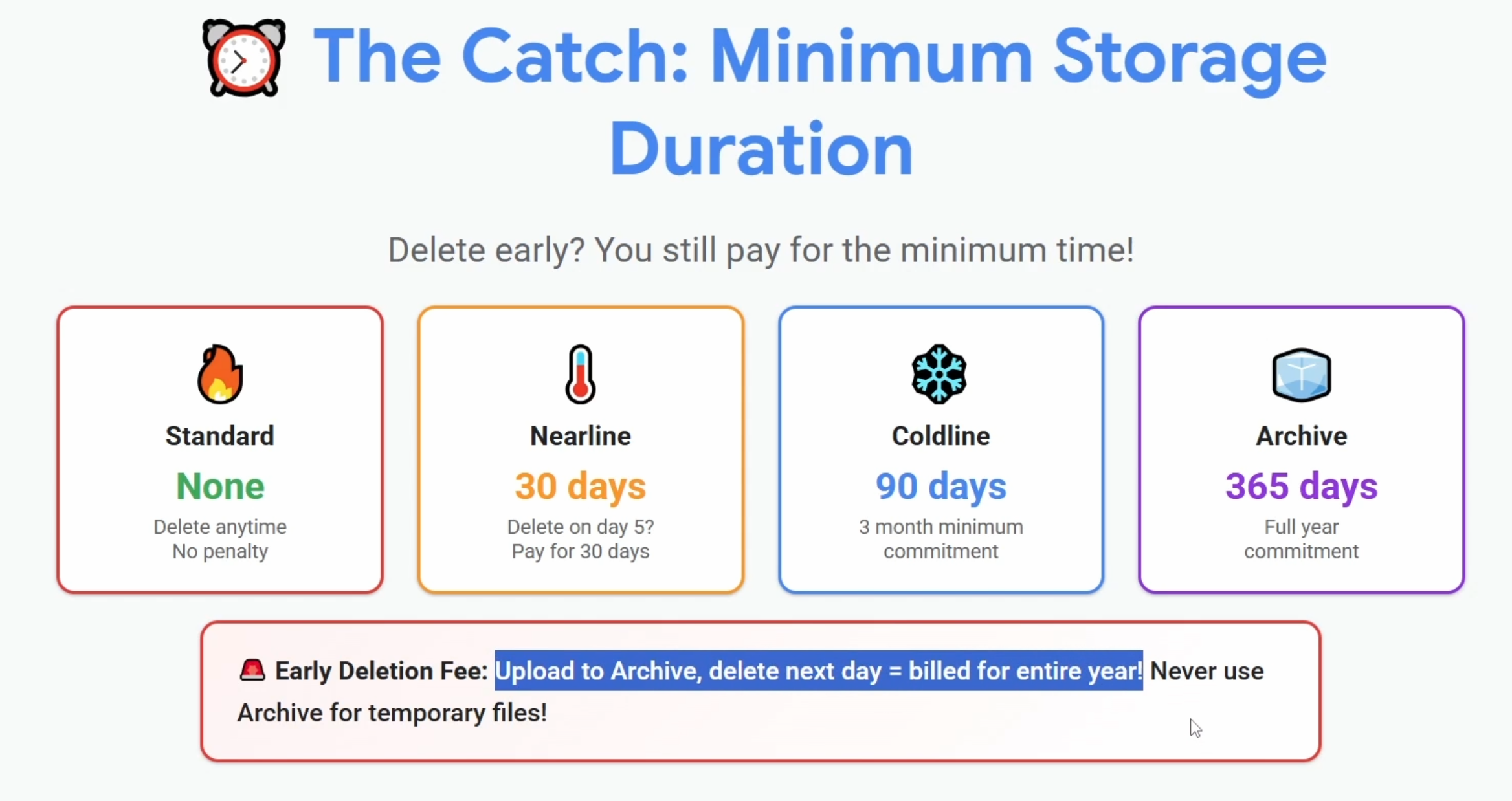
And for early deletion fee. The author explained pretty well and easy to understand in this picture:
And there is little different in retrieval time of GCP vs AWS/Azure:
- Archive in GCP allow you able to read data from archive class
- AWS (S3 Glacier) / Azure (Archive Tier): ask you to wait 3 to 12 hours to retrieve data after "request restore".
Policies & Permissions
- Signed URL in GCP (GCS) = SAS Token in Azure (Blob Storage) = Presigned URL in AWS (S3)
- Delete encryption key = permanent data loss, because there is no way to decrypt files storage in bucket without key (But we have Pending deletion for key and soft delete for files in bucket. So don't worry if accident happens xD).
- Lifecycle policy management: same as other, move files from current classes to other classes or delete it for costs saving. But wait, early deletion fees STILL apply if objects are deleted or overwritten before their minimum duration (30d Nearline, 90d Coldline, 365d Archive)! Though transitions themselves are free, and Autoclass buckets are exempt from early deletion fees.
- And use lifecycle for know, autoclass for unknown. Age condition then set storage class actions.
- Autoclass ignores file size < 128Kb by default, it only transitions to Nearline (unless you configured it for Archive).
- And even with Automation, remember minimum durations: Nearline(30 days), Coldline(90 days), Archive (365 days)
- Uniform Bucket-Level access is the standard, no need legacy ACL and required to use feature like Managed Folders. And enabling Uniform bucket-level access will disable existing object-level ACLs.
Storage Transfer Service (STS)
- Use when needed for large transfers into GCS: support Cloud to Cloud or On-premises to Cloud
- Able to run directly or via scheduling, run synchronization and have data integrity for validation.
Bucket Lock (Retention Policy Lock - Compliance)
- Set retention policy for WORM (Write Once, Read Many) compliance.
- Exam trap: Once you Lock the retention policy, it is IRREVERSIBLE. Neither the Project Owner nor Google Cloud Support can unlock it, delete the bucket, or reduce the retention duration until it expires.
Data Migration: STS vs Transfer Appliance
- Storage Transfer Service (STS): Online over-the-network transfer (from S3/Azure/on-prem).
- Transfer Appliance: High-capacity physical hardware appliance shipped to your datacenter. Choose this when data volume is massive (>10-20 TB up to PB) and network bandwidth is too slow/constrained.
Dual-Region & Turbo Replication
- Dual-Region: Replicated across 2 specific regions asynchronously by default (no strict replication time SLA).
- Turbo Replication: An optional, paid add-on that provides an SLA-backed guarantee: 100% of newly written objects are replicated to the paired region within 15 minutes (critical for strict DR/RPO requirements).
8. Managed Databases in GCP
Relational (SQL) options
- Cloud SQL: Mysql, PostgreSQL, SQL Server...
- AlloyDB: PostgreSQL by GCP, not fuckin' open source xD, like Aurora in AWS.
- Cloud Spanner: horizontally scalable Relational (SQL) database (AWS doesn't have a direct equivalent, but think of it as managed CockroachDB/YugabyteDB). Offers a signature SLA of 99.999% for multi-region (and 99.99% for single-region).
NoSQL options
- Firestore: Document database, like MongoDB. Perfect for mobile/web apps
- Bigtable: Wide-column NoSQL database, same as Apache HBase or Apache Cassandra. (Clickhouse/TiFlash are OLAP column stores, their actual GCP equivalent is BigQuery, not Bigtable).
- Use cases: IoT data, clickstreams, time-series, financial data. Massive scale, high-throughput, and low latency (TB to PB).
- Key exam points:
- Single index: Data is only indexed by the row key.
- Avoid Hotspotting: Sequential row keys (like raw timestamps or alphabetical ID sequences) cause traffic to hit a single node (hotspotting). Prevent this by salting (pre-pending a hash), reversing IDs, or promoting fields.
- Dynamic scale: Storage is decoupled from compute. You can dynamically add/remove nodes to scale throughput/IOPS without downtime or data migration.
- Storage Types: SSD (default, recommended for low-latency queries) vs HDD (recommended for large historical/archival datasets where latency isn't critical).
- Tooling: Use the
cbtCLI tool to interact with and query Bigtable.
- MemoryStore: Redis/Memcached
Backup & Recovery
- PITR (Point-in-Time Recovery): Always restores to a NEW database instance with a NEW IP address; the original instance remains untouched. And this required enable binary logigng option!
- Automated backups: Bound to the instance lifecycle (deleted when the instance is deleted). Export to GCS for permanent retention.
High availability (HA) vs Failover Trap
- HA Failover: Uses a standby instance in a secondary zone and regional PD. IP address DOES NOT CHANGE during failover (no connection string reconfig needed for apps!).
- Cloud SQL Auth Proxy: Google-recommended best practice to connect from apps/GKE/VMs to Cloud SQL over IAM & TLS without managing SSL certs or whitelisting public IPs.
Exam Decision Matrix: Which Database to Pick?
- Cloud SQL: Traditional RDBMS (PostgreSQL/MySQL/SQL Server), single-region, OLTP.
- Cloud Spanner: Global/Multi-region distributed SQL, horizontal write scaling, 99.999% SLA.
- Firestore: Mobile/web document DB, real-time client sync, offline support.
- Bigtable: Heavy write throughput, low latency (<10ms), IoT/time-series/financial data (TB to PB).
- BigQuery: OLAP / SQL queries on petabytes (never use Bigtable for analytical ad-hoc aggregations).
Other shit
- Want a centralized view -> go for Database Center
- AlloyDB is a fully managed PostgreSQL-compatible database service for your most demanding enterprise database workloads
Cloud Managed Services vs. Open-Source Equivalents
Not related but I want to put here, everytime I see services in AWS/GCP/Azure, I often search if there is same solution but open-source. So here is my little research:
- GCP Cloud Spanner = CockroachDB/YugabyteDB (Distributed SQL).
- AWS DynamoDB = ScyllaDB (Distributed NoSQL, Key-Value/Documents.
- Cloud-Native RDBMS: Aurora (AWS) & AlloyDB (GCP). Not multi-write, still using single master (primary node for write).
9. Big Data & Analytics Platforms
BigQuery Optimization (Exam Favorites)
- Partitioning: Segments table by a Date/Timestamp column. Massive cost & performance booster because queries only scan the relevant partition (e.g.
WHERE date = '2026-01-01'). - Clustering: Colocates and sorts data based on up to 4 columns. Best for high-cardinality filters (
WHERE customer_id = 123). - Best Practice: Partition by date first, then cluster by frequently filtered dimensions.
- BigQuery dry run: Estimates the number of bytes a query will scan and validates syntax for free, without using query slots or processing actual data.
Dataproc vs Dataflow (Cheat Sheet)
- Dataproc: Managed Hadoop / Spark / Hive (AWS EMR equivalent). Pick this when migrating existing on-prem Spark/Hadoop jobs with minimal code changes.
- Dataflow: Fully managed, serverless stream/batch processing based on Apache Beam. No clusters to size or manage. For example: Raw Data (CSV, logs...) --> Dataflow (Transform/aggregate) --> Clean Data in BigQuery.
- Pub/Sub: Ingestion buffer for streaming pipelines (Global, decoupled, at-least-once delivery).
10. Managed file storage
- Filestore: Managed NFSv3 (POSIX-compliant) file share. Equivalent to AWS EFS / Azure Files.
- ReadWriteMany (RWX): Pick this when multiple VMs or GKE pods must mount and concurrently write to the same shared filesystem (since Persistent Disks only support multi-attach in
ReadOnlymode). - Use cases: Legacy apps lift-and-shift, shared CMS (WordPress media), GKE shared PVCs.
- Minimum provisioned size starts at 1 TiB (applies to legacy Basic HDD/SSD; newer Zonal and Enterprise tiers have different minimum capacity thresholds).
- ReadWriteMany (RWX): Pick this when multiple VMs or GKE pods must mount and concurrently write to the same shared filesystem (since Persistent Disks only support multi-attach in
- Google Cloud NetApp Volumes: Enterprise-grade NFS/SMB file services (primarily for Windows SMB workloads and high-performance enterprise storage).
11. Virtual Private Cloud (VPC) Networking
Unlike AWS or Azure, a Google VPC is Global by default, remember this!
Auto vs Custom Mode VPC (One-way street!)
- Auto Mode: Creates a
/20subnet in every region automatically. Risk of IP overlapping with on-prem networks. - Custom Mode: Production standard. Zero subnets by default; define your own CIDRs.
- Exam trap: You can convert Auto Mode to Custom Mode (
switch-mode --mode=custom), but CANNOT convert Custom Mode back to Auto Mode.
Subnet
- Subnets are regional resources. They are Cross-zone (meaning a single subnet spans all zones within its region!)
- When IPs in subnet run out of IP, zero downtime expansion, I meaning it is able to change the subnet mask (ex: from /24 to /20) without fuckin' downtime! And yeah expand is easy but not able to shrink xD, like volumes.
Cloud NGFW
It is fuckin' stateful, meaning you only need to allow ingress and it will allow egress for you! No need a seprate egress rule.
Hierarchical firewall policies: Enforce consistent firewall policies across the entire Organization or Folder levels (evaluated before VPC firewall rules).
Shared VPC
No need to talk about VPC Peering but shared VPC, one network, many projects:
- Multiple projects share the same VPC
- Centralized control by networking team
- One set of firewall rules for all
Private access to google services private
How to enable:
- Per subnet setting (you can turn it on in subnet setting)
- Internal traffic only
- Google services only.
What we can access via private services:
- Cloud Storage
- BigQuery
- Pub/Sub
- Cloud Logging & Monitoring
- Container Registry
- Artifact Registry
PGA vs PSA (Don't confuse these two!)
- Private Google Access (PGA): Subnet-level setting. Allows VMs with only internal IPs to reach Google APIs (Cloud Storage, BigQuery, Pub/Sub).
- Private Services Access (PSA): Internal peering connection to reach managed services inside Google's tenant VPC (specifically Cloud SQL & Memorystore).
If you need internet access, you will need cloud NAT, hmm what about Cloud NAT:
- One Cloud Nat gateway for the fuckin' entire subnet or region.
- Auto scales to handle traffic from thousands of VMs.
- Outbound only.
Cloud DNS & Hybrid Resolution
- Inbound DNS forwarding: Allows on-premises networks to resolve private DNS zones hosted in Cloud DNS by configuring a DNS server policy.
12. Load Balancer
Nothing to talk much about this section, remember the different between 2 tiers; Standard vs Premium Tier:
- Standard Tier: cheaper, more hops, can not use global LB.
- Premium Tier: cost more, less hops (which mean faster, lower latency).
GCP Load Balancing Quirks vs AWS
- Global Anycast IP: Unlike AWS (which provides regional DNS names), GCP Global External LBs provide a single Anycast IP globally. Traffic enters Google's private backbone at the nearest edge PoP(Point of Presence).
- Proxy vs Passthrough (Client IP Trap):
- Proxy LBs (L7 HTTP/S & SSL Proxy): Terminates connection at LB. Backend sees LB proxy IP; original IP is in
X-Forwarded-For. - Passthrough LBs (L4 Network LB): Does NOT terminate TCP. Preserves original client source IP natively at packet level (Direct Server Return).
- Proxy LBs (L7 HTTP/S & SSL Proxy): Terminates connection at LB. Backend sees LB proxy IP; original IP is in
- Health Check Firewall Trap: If all backend VMs report unhealthy, verify firewall allows health check probes from Google's fixed IP ranges:
35.191.0.0/16and130.211.0.0/22. - Cloud Armor (WAF/DDoS) & Cloud CDN: Can ONLY attach to External Application Load Balancers (HTTP/HTTPS).
Other shit
- When autoscaling based on Load Balancing capacity, you must first define the capacity (Maximum RPS) in the Backend Service. Once defined, configure the autoscaler to maintain a target utilization percentage (commonly 80%) of that capacity.
13. Infrastructure as Code (IaC) & CI/CD
LOL, first time I heard about Config Connector, you have k8s cluster running in GCP, manifest with kind Storage Bucket, kubectl apply that fuckin' file, config connector calls GCP APIs.
And Fabric FAST, ready-made landing zone for new org with pre-built terraform modules, GCP best practices, secure by default, production-ready.
Terraform on GCP Best Practice
- GCS Remote Backend: Natively supports state locking (no separate locking database required like legacy AWS S3/DynamoDB setup).
- State Security: Always enable Object Versioning on the state GCS bucket to protect against state file corruption or accidental overwrites.
Cloud Deployment Manager (GCP Native IaC)
- Google's native declarative service (equivalent to AWS CloudFormation / Azure ARM). Uses YAML configs with Jinja2 or Python templates. (Though Google officially recommends Terraform now).
CI/CD: Source Repositories, Cloud Build & Cloud Deploy
- Cloud Source Repositories (CSR): Fully managed private Git repositories hosted on Google Cloud (AWS CodeCommit equivalent). Integrates natively with Cloud Build triggers and uses Cloud IAM for access control.
- Cloud Build: Fully managed serverless build service (equivalent to AWS CodeBuild / GitHub Actions).
- Defined via
cloudbuild.yaml(or Dockerfile) using containerized steps (name: 'gcr.io/cloud-builders/docker',name: 'gcr.io/google.com/cloudsdktool/cloud-sdk'). - Triggers: Automatically runs builds on code pushes or PRs from GitHub, GitLab, or Cloud Source Repositories.
- Service Account Permissions Trap: Cloud Build executes under its default service account (
[project-number]@cloudbuild.gserviceaccount.com). To deploy to GKE or Cloud Run, you MUST explicitly grant that service account the required target roles (e.g.roles/run.admin,roles/container.developer,roles/iam.serviceAccountUser). - Cloud Deploy: Managed, opinionated continuous delivery pipeline for GKE, Cloud Run, and Anthos. Provides multi-target promotion (dev -> staging -> prod), release approvals, and automatic rollbacks.
AI Tooling
- Application Design Center: is a console tool that converts plain language descriptions into visual architecture diagrams and deployable Terraform code, using pre-approved, best-practice templates.
- Cloud Hub: is your unified operational dashboard, giving a single view of application health, alerts, costs, security findings, and quota usage across all your deployed applications.
14.Monitoring
Nothing much worht to mention here, except Gemini Cloud Assist, since we sent logs, metrics to GCP and simply we only need ask Gemini what is the fuckin' wrong, it's accuracy about 70-80%. Pretty sure we need to validate it before apply xD
Multi-Project Monitoring (Metrics Scope)
- Host multiple projects under a single Scoping Project.
- Allows a central SRE team to view dashboards, charts, and alerts across multiple projects in a single pane of glass.
Log-based Metrics (Bridge between Logs & Alerts)
- Convert log occurrences (e.g. counting
ERROR 500strings or regex matches) into measurable metrics in Cloud Monitoring to trigger alert policies.
Uptime Checks & Muting Rules
- Uptime Checks: Probes public endpoints from multiple global locations to verify external availability and latency.
- Muting Rules: Temporarily suppress notification channels during planned maintenance windows.
Ops Agent (Guest-level Metrics)
- Default Compute Engine monitoring only captures hypervisor-level metrics (CPU, disk throughput, network).
- To monitor Memory (RAM) utilization, available disk space, and process-level metrics, you MUST install the Google Cloud Ops Agent inside the VM.
15. Logging
GCP Cloud logging = AWS CloudWatch Logs.
- Log Buckets are container within cloud logging. _Required bucket stores for 400 days and can not be disabled. _Default bucket stores for 30 days by default,retention can be optimized.
- Buckets are regional, a specialized, database-like engine built exclusively inside Cloud Logging.
- Log Analytics allows you to run SQL queries directly against your log data without exporting it to BigQuery.
- You can upgrade existing bucket to use Log Analytics.
- Cloud Audit Log GCP = AWS CloudTrail
- Need more metrics (Ram, disk space used, app metrics...), required to install Agent Metrics (Ops Agent).
- Cloud Trace is for tracing, find latency bottlenecks, why this shit takes 5 seconds to complete!
- Cloud Profiler is for code performance: Finding cpu/memory leaks in specific functions.
- Query Insights helps you identify slow SQL queries in Cloud SQL based on CPU and latency.
Log Router Sinks & Writer Identity Trap
- 4 Valid Destinations:
- Cloud Storage: Cheap long-term compliance archival.
- BigQuery: Analytical querying & BI dashboards.
- Pub/Sub: Stream logs to external SIEMs (Splunk, Datadog, Elastic) or trigger automation.
- Another Cloud Logging Bucket: Centralize logs in a dedicated security/compliance project.
- Writer Identity Trap: Creating a sink generates a unique service account (Writer Identity). You MUST explicitly grant that identity write permission on the destination resource (e.g.
Storage Object Creatoron the target GCS bucket).
Cloud Audit Logs: Admin Activity vs Data Access
- Admin Activity: Modifying metadata/configs (create VM, update IAM). Always ON, FREE, retained 400 days in
_Required. - Data Access: Reading or writing user data (reading GCS objects, querying tables). DISABLED by default (except BigQuery) to prevent massive volume & ingestion costs. Must be manually enabled.
Exclusion Filters (Cost Optimization)
- Drop noisy, high-volume logs (e.g., LB health check pings or verbose
DEBUGlogs) before ingestion to avoid storage charges.
16. Other shit
- Vertex AI Workbench (rebranded to Gemini Enterprise Agent Platform Workbench since Cloud Next '26): Managed Jupyter notebook-based development environments on Google Cloud without managing infrastructure. (Exam questions still refer to it as Vertex AI Workbench).
- Active Assist refers to the portfolio of tools used in Google Cloud to generate recommendations and insights to help you optimize your Google Cloud projects (cost, security, performance).
- Data Encryption Tiers (KMS Trap):
- Google-default: Encrypted at rest automatically with Google-managed keys (zero config, free).
- CMEK: Keys generated and managed in Google Cloud KMS (customer controls rotation and IAM).
- CSEK: Keys generated and kept on-premises by customer, provided with API calls. Google NEVER stores CSEK keys (if you lose the key, data is permanently unrecoverable).
- Artifact Registry: The official and sole container/package registry on GCP following the shutdown of Container Registry (GCR) in early 2025. Supports Docker/OCI images, Helm charts, and language packages (npm/Maven/Python) with fine-grained per-repository IAM (legacy
gcr.iohostnames automatically route to Artifact Registry repositories). - Secret Manager: Securely stores API keys and credentials with versioning. Applications only need
roles/secretmanager.secretAccessorto retrieve secret payloads. - Cloud Shell:
- Ephemeral VM with a persistent 5 GB
$HOMEdirectory. Auto-terminates after 20 minutes of inactivity (anything outside$HOMEis lost). - Environment customization: Runs
$HOME/.customize_environmentonce when the instance boots to install packages/tools automatically.
- Ephemeral VM with a persistent 5 GB
- Google Cloud's Tensor Processing Units (TPUs) are custom-built to help speed up machine learning workloads
17. Conclusion
A quick wrap-up for anyone preparing for the exam:
- Hands-on labs are not strictly mandatory: If you already have a solid foundation in Linux, networking, containers, and another major cloud (AWS/Azure), you don't necessarily need to spend hours doing hands-on labs to pass this exam (like me xD). Grasping the architectural concepts, GCP-specific terminologies, and exam traps is more than enough.
- Practice Exams: Highly recommend checking out this course to get familiar with question patterns and real exam scenarios: Google Certified Associate Cloud Engineer Practice Exams on Udemy.
- Final thoughts: This is definitely my last cloud cert for now because I don't really have many opportunities to work extensively with cloud infrastructure in my current daily work. I will only aim for higher-level certs (like Professional DevOps / Architect) when I actually have the chance to work directly with production cloud infra.