
Istio Certified Associate (ICA) Overview
1. Service Mesh Fundamentals
Understanding the "Why" before the "How."
- What is a Service Mesh: A dedicated infrastructure layer for managing service-to-service communication in microservices architectures.
- The Need for Istio: Solving challenges like traffic management, security, and observability without modifying application code.
- Sidecar vs. Ambient Mode: Understanding the two deployment models — Sidecar (Envoy proxy per pod) vs. Ambient (ztunnel + waypoint proxies).
2. Istio Core Architecture
The backbone of the service mesh.
- Control Plane (istiod): The brain of Istio — handles configuration, certificate management, and service discovery.
- Data Plane: Envoy proxies that intercept and manage all network traffic between services.
- Key Components: All consolidated into
istiod— handles traffic management (formerly Pilot), security/mTLS (formerly Citadel), and configuration validation (formerly Galley).
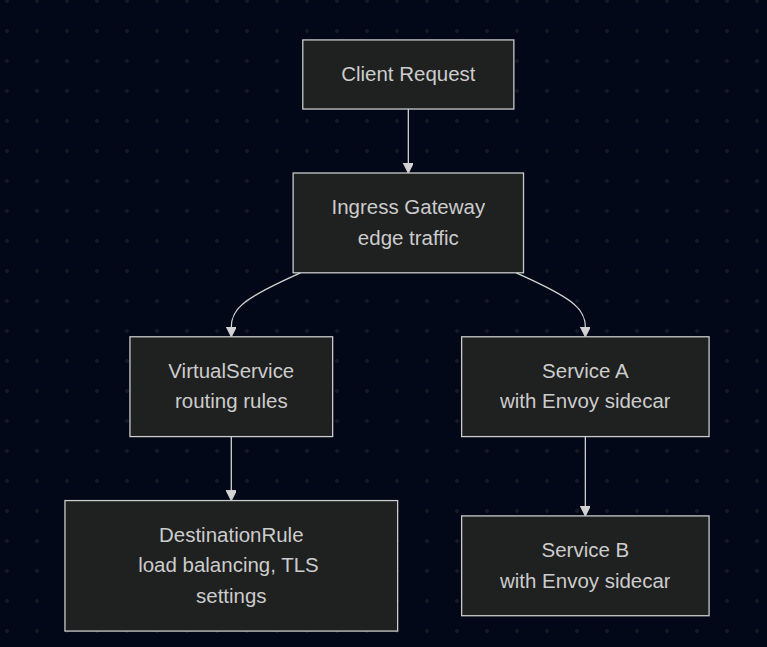
Example of Traffic Flow:
3. Installation, Upgrade & Configuration (20%)
Getting Istio up and running.
- Installation Methods: Using
istioctl installor Helm charts. - Installation Profiles: Understanding
default,demo,minimal, andambientprofiles. - Customizing Installation: Using IstioOperator resource for advanced configurations.
- Upgrade Strategies: Canary upgrades (run two control planes) vs. In-place upgrades.
4. Traffic Management (35%)
The largest exam domain — master this well.
- Ingress & Egress: Configuring Gateway resources for north-south traffic. (North-South = traffic comes from external)
- VirtualService: Defining routing rules (host-based, header-based, URI matching).
- DestinationRule: Configuring load balancing policies, connection pools, and outlier detection.
- Traffic Shifting: Canary deployments and A/B testing with weighted routing.
- Resilience Features: Circuit breaking, retries, timeouts, and failover.
- Fault Injection: Testing resilience by injecting delays or HTTP errors.
- ServiceEntry: Connecting in-mesh workloads to external services.
5. Securing Workloads (25%)
Zero-trust security model.
- Mutual TLS (mTLS): Automatic encryption between services using PeerAuthentication.
- Authorization Policies: Fine-grained access control (allow/deny based on source, operation, conditions).
- RequestAuthentication: Validating JWT tokens at the mesh edge.
- Securing Edge Traffic: Configuring TLS termination and passthrough at the Ingress Gateway.
6. Troubleshooting (20%)
Debugging when things go wrong.
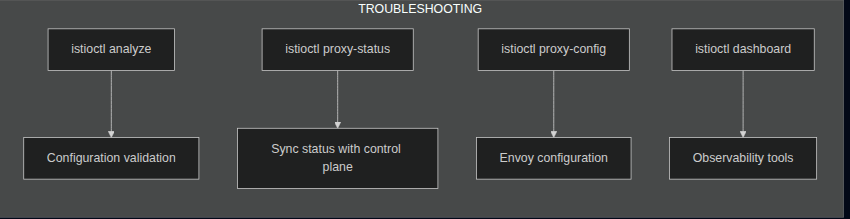
- Configuration Issues: Using
istioctl analyzeto detect misconfigurations. - Control Plane Debugging: Checking istiod logs, sync status, and xDS (x Discovery Service) configuration.
- Data Plane Debugging: Using
istioctl proxy-status,proxy-config, and Envoy admin interface. - Common Issues: 503 errors, mTLS conflicts, missing sidecars, and routing mismatches.
Sections That Need to Be Understood
1. Sidecar vs. Ambient Mode
Domain: Installation, Upgrade & Configuration
Istio offers two data plane modes. Understanding the differences is crucial for the exam.
Sidecar Mode (Traditional):
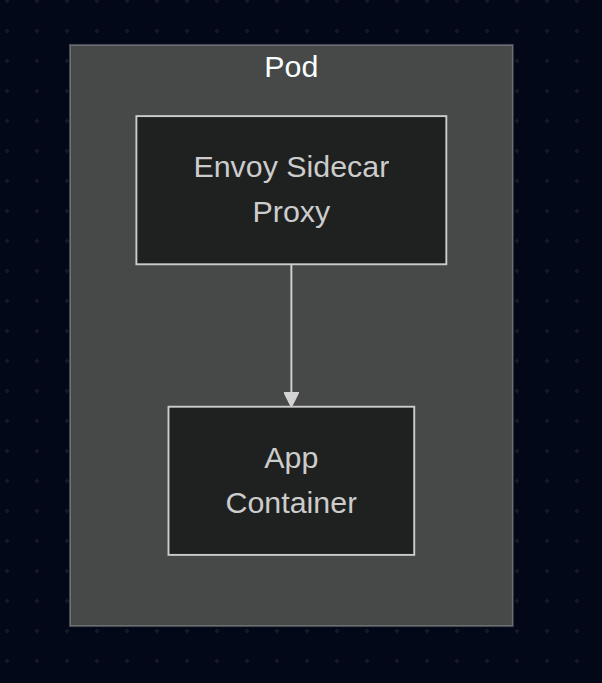
- Every pod gets its own Envoy proxy injected as a sidecar container.
- Pros: Full L7 features, mature and battle-tested.
- Cons: High resource overhead (memory/CPU per pod), increased latency.
Ambient Mode (Sidecar-less):
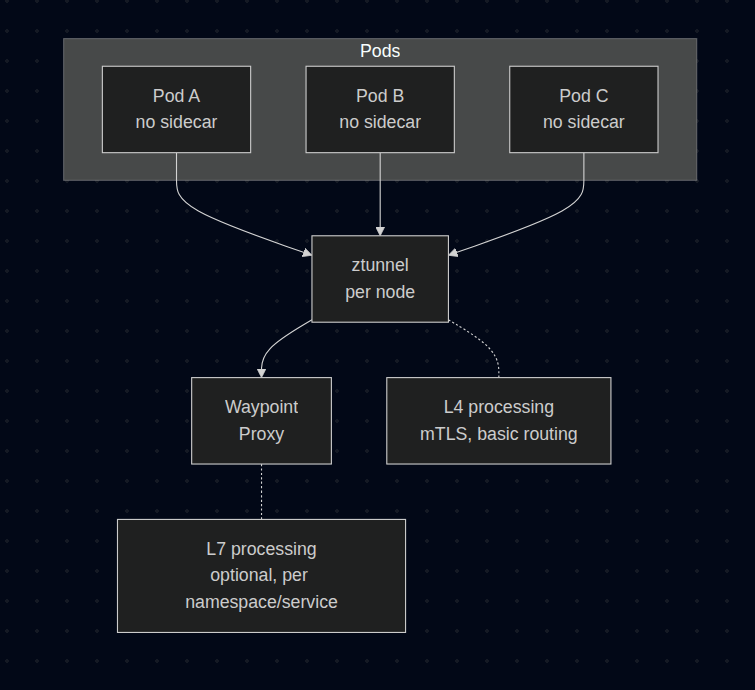
- ztunnel: Node-level proxy handling L4 (TCP, mTLS).
- Waypoint Proxy: Optional L7 proxy deployed per namespace or service.
- Pros: Lower resource usage, simpler operations, no sidecar injection needed.
- Cons: Newer, some L7 features require waypoint deployment.
| Feature | Sidecar Mode | Ambient Mode |
|---|---|---|
| Resource overhead | High (per pod) | Low (per node) |
| L4 mTLS | Supported | Supported (ztunnel) |
| L7 features | Support (always) | Support (needs waypoint) |
| Injection required | Yes | No |
| Maturity | Stable | Newer (GA in 1.24+) |
References:
2. VirtualService & DestinationRule Relationship
Domain: Traffic Management
These two resources work together and are the most important concepts for the exam.
TLDR: This may be complicated for you to understand (same for me). But no worry, just read the fucking document and practice here, it is fucking best lab based in my opinion to explain how Virtual Service and Destination Rule work together!
KillerCoda ICA - Traffic Management - Request Routing
It could be a little outdated, but still good to practice
controlplane:~$ istioctl version
client version: 1.18.2
control plane version: 1.18.2
data plane version: 1.18.2 (3 proxies)
So you have to change apiVersion from networking.istio.io/v1 to networking.istio.io/v1alpha3 to prevent issue in that scenario!
Resource Relationship:
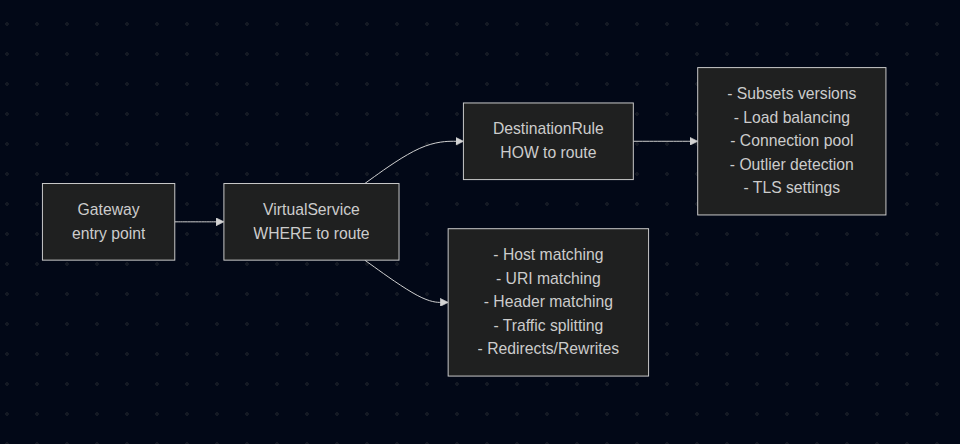
Can be retrieved with: k get vs
controlplane:~$ k api-resources |grep -i virtual
virtualservices                     vs           networking.istio.io/v1beta1       true         VirtualService
VirtualService — Defines WHERE traffic goes: This may complicate as hell, try to start simple with hosts and http route + destination!
apiVersion: networking.istio.io/v1beta1
kind: VirtualService
metadata:
  name: reviews-routing
spec:
  hosts:
    - reviews                          # Target service / Kubernetes Service Name!
  gateways:
    - mesh                             # For internal mesh traffic
    - bookinfo-gateway                 # For external traffic
  http:
    - match:
        - headers:
            end-user:
              exact: jason             # Header-based routing
      route:
        - destination:
            host: reviews
            subset: v2                 # Route to v2 for user "jason"
    - route:
        - destination:
            host: reviews
            subset: v1
          weight: 80                   # 80% to v1
        - destination:
            host: reviews
            subset: v3
          weight: 20                   # 20% to v3
DestinationRule — Defines HOW traffic is handled: This is also fucking complicated, try to simplify as kind: DestinationRule in HERE
Can be retrieved with: k get dr
controlplane:~$ k api-resources |grep -i dest
destinationrules                    dr           networking.istio.io/v1beta1       true         DestinationRule
apiVersion: networking.istio.io/v1beta1
kind: DestinationRule
metadata:
  name: reviews-destination
spec:
  host: reviews                        # Must match VirtualService destination
  trafficPolicy:
    connectionPool:
      tcp:
        maxConnections: 100
      http:
        h2UpgradePolicy: UPGRADE
        http1MaxPendingRequests: 100
    loadBalancer:
      simple: ROUND_ROBIN              # ROUND_ROBIN, LEAST_CONN, RANDOM, PASSTHROUGH
    outlierDetection:
      consecutive5xxErrors: 5
      interval: 10s
      baseEjectionTime: 30s
  subsets:
    - name: v1
      labels:
        version: v1                    # Pod selector
    - name: v2
      labels:
        version: v2
      trafficPolicy:                   # Subset-specific policy
        loadBalancer:
          simple: LEAST_CONN
    - name: v3
      labels:
        version: v3
Summary:
# DestinationRule define subset
subsets:
- name: v1
  labels:
    version: v1

# VirtualService route to that subset
route:
- destination:
    host: my-svc
    subset: v1  # refer to DestinationRule
VirtualService and DestinationRule are namespace-scoped. But can be reference cross-namespace by FQDN my-svc.other-namespace.svc.cluster.local in host field!
Extra note: Order matters!
With this VirtualService, subset v2 will be ignored. Because Istio is working with the rule: First Match Wins.
apiVersion: networking.istio.io/v1alpha3
kind: VirtualService
metadata:
  name: notification
  namespace: default
spec:
  hosts:
  - notification-service.default.svc.cluster.local
  http:
    - route:
      - destination:
          host: notification-service.default.svc.cluster.local
          subset: v1
    - route:
      - destination:
          host: notification-service.default.svc.cluster.local
          subset: v2
      match:
      - headers:
          testing:
            exact: "true"
So we have to move subset v2 to be the first entry, then follow with subset v1!
Another thing you should notice, that both resource VirtualService and DestinationRule have to define hosts? Why not merge them???
It is Separation of Concerns of Istio.
VirtualServiceis router for traffic filter, where the fuck you want to go?DestinationRuleis policy, traffic have been arrived, how would you act?
So, in explanation of SQL. hosts is Foreign Key to match table VirtualService to table DestinationRule xD
Conclusion: It took me about 2 hours to understand this properly!
Key Point: VirtualService references subsets defined in DestinationRule. Always create DestinationRule before or together with VirtualService.
References:
3. Gateway Configuration
Domain: Traffic Management
Gateway defines the entry/exit points for traffic entering or leaving the mesh.
You may want to know where istio: ingressgateway in the selector field comes from xD
controlplane:~$ kubectl get pods -A -l istio=ingressgateway
NAMESPACE      NAME                                    READY   STATUS    RESTARTS   AGE
istio-system   istio-ingressgateway-78dcb6c4fb-72j69   1/1     Running   0          4m22s
Ingress Gateway (North-South Traffic IN):
apiVersion: networking.istio.io/v1beta1
kind: Gateway
metadata:
  name: bookinfo-gateway
spec:
  selector:
    istio: ingressgateway              # Use Istio's default ingress gateway.
  servers:
    - port:
        number: 80
        name: http
        protocol: HTTP
      hosts:
        - "bookinfo.example.com"
    - port:
        number: 443
        name: https
        protocol: HTTPS
      hosts:
        - "bookinfo.example.com"
      tls:
        mode: SIMPLE                   # TLS termination
        credentialName: bookinfo-cert  # K8s secret with TLS cert
TLS Modes:
| Mode | Description | Use Case |
|---|---|---|
SIMPLE |
TLS termination at gateway | Standard HTTPS |
MUTUAL |
mTLS - client cert required | High security, need correct keys: tls.crt tls.key ca.crt |
PASSTHROUGH |
TLS passed to backend | Backend handles TLS |
ISTIO_MUTUAL |
Istio mTLS | Internal mesh traffic |
Connect Gateway to VirtualService:
apiVersion: networking.istio.io/v1beta1
kind: VirtualService
metadata:
  name: bookinfo-vs
spec:
  hosts:
    - "bookinfo.example.com"
  gateways:
    - bookinfo-gateway                 # Reference the Gateway
  http:
    - route:
        - destination:
            host: productpage
            port:
              number: 9080
Small reminder for you and for me, if you have been learning in Cilium or K8S modern technical Gateway API. You will notice and ask if they are the same?
In fact, they are the same for concept, they are all config, they need a real proxy (Envoy/Cilium/Nginx) behind to handle traffic. Here is a little comparison:
| Component | K8s Gateway API | Istio Gateway |
|---|---|---|
| Listener | Gateway | Gateway (included host, TLS) |
| Routing | HTTPRoute | VirtualService |
| Selector | gatewayClassName |
selector: istio: ingressgateway |
Egress Gateway (North-South Traffic OUT): Just need to memorize syntax, I will have a section explain this below with ServiceEntry and VirtualService with Egress Gateway together to see how it works!
apiVersion: networking.istio.io/v1beta1
kind: Gateway
metadata:
  name: istio-egressgateway
spec:
  selector:
    istio: egressgateway
  servers:
    - port:
        number: 443
        name: tls
        protocol: TLS
      hosts:
        - "external-api.example.com"
      tls:
        mode: PASSTHROUGH
References:
4. Traffic Shifting & Canary Deployments
Domain: Traffic Management
Gradually shift traffic between service versions for safe deployments.
Weighted Routing (Canary):
apiVersion: networking.istio.io/v1beta1
kind: VirtualService
metadata:
  name: reviews
spec:
  hosts:
    - reviews
  http:
    - route:
        - destination:
            host: reviews
            subset: v1
          weight: 90                   # 90% to stable version
        - destination:
            host: reviews
            subset: v2
          weight: 10                   # 10% to canary version
Header-Based Routing (A/B Testing):
apiVersion: networking.istio.io/v1beta1
kind: VirtualService
metadata:
  name: reviews
spec:
  hosts:
    - reviews
  http:
    - match:
        - headers:
            x-canary:
              exact: "true"            # Route if header present
      route:
        - destination:
            host: reviews
            subset: v2
    - route:
        - destination:
            host: reviews
            subset: v1                 # Default route
Traffic Mirroring (Shadow Traffic):
apiVersion: networking.istio.io/v1beta1
kind: VirtualService
metadata:
  name: reviews
spec:
  hosts:
    - reviews
  http:
    - route:
        - destination:
            host: reviews
            subset: v1
      mirror:
        host: reviews
        subset: v2                     # Mirror traffic to v2
      mirrorPercentage:
        value: 100.0                   # Mirror 100% of traffic
Key Point: Mirrored traffic is "fire and forget" — responses from the mirror are discarded.
References:
5. mTLS & PeerAuthentication
Domain: Securing Workloads
Istio can automatically encrypt all service-to-service traffic using mutual TLS.
PeerAuthentication Modes:
| Mode | Description |
|---|---|
STRICT |
Only mTLS traffic allowed (reject plaintext) |
PERMISSIVE |
Accept both mTLS and plaintext (migration mode) |
DISABLE |
Disable mTLS |
UNSET |
Inherit from parent scope |
Scope Hierarchy:
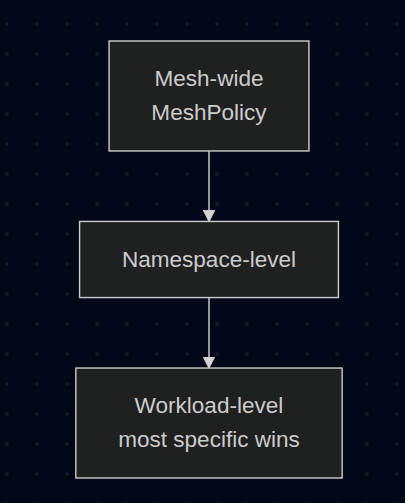
Mesh-wide STRICT mTLS:
apiVersion: security.istio.io/v1beta1
kind: PeerAuthentication
metadata:
  name: default
  namespace: istio-system              # istio-system = mesh-wide
spec:
  mtls:
    mode: STRICT
Namespace-level mTLS:
apiVersion: security.istio.io/v1beta1
kind: PeerAuthentication
metadata:
  name: default
  namespace: production                # Applies to production namespace
spec:
  mtls:
    mode: STRICT
Workload-level mTLS: The guard decides to accept or reject traffic. With STRICT, it said: I only accept TLS, plaintext will get rejected! Not related to anything client-side!
apiVersion: security.istio.io/v1beta1
kind: PeerAuthentication
metadata:
  name: reviews-mtls
  namespace: production
spec:
  selector:
    matchLabels:
      app: reviews                     # Only applies to reviews service
  mtls:
    mode: STRICT                       # All port requires mTLS
  portLevelMtls:
    8080:
      mode: PERMISSIVE                 # Port-specific override that allow both mTLS and plaintext
DestinationRule TLS Settings (Client-side):
apiVersion: networking.istio.io/v1beta1
kind: DestinationRule
metadata:
  name: reviews-mtls
spec:
  host: reviews
  trafficPolicy:
    tls:
      mode: ISTIO_MUTUAL               # Use Istio's mTLS
Key Point: PeerAuthentication = server-side (what traffic to accept). DestinationRule tls = client-side (how to connect).
References:
6. AuthorizationPolicy
Domain: Securing Workloads
Fine-grained access control for workloads.
Policy Actions:
| Action | Description |
|---|---|
ALLOW |
Allow matching requests (default deny all others) |
DENY |
Deny matching requests |
CUSTOM |
Delegate to external authorizer |
AUDIT |
Audit matching requests (logging only) |
Deny-All Policy (Zero Trust Baseline):
apiVersion: security.istio.io/v1beta1
kind: AuthorizationPolicy
metadata:
  name: deny-all
  namespace: production
spec:
  {}                                   # Empty spec = deny all
Allow Specific Traffic:
apiVersion: security.istio.io/v1beta1
kind: AuthorizationPolicy
metadata:
  name: allow-productpage
  namespace: production
spec:
  selector:
    matchLabels:
      app: productpage
  action: ALLOW
  rules:
    - from:
        - source:
            principals: ["cluster.local/ns/production/sa/frontend"]
      to:
        - operation:
            methods: ["GET"]
            paths: ["/api/*"]
      when:
        - key: request.headers[x-token]
          values: ["valid-token"]
You will be thinking WTF is this? So I will start explain it now xD
principals is SPIFFE ID (A SPIFFE ID is a string that uniquely and specifically identifies a workload)
cluster.local/ns/production/sa/frontend
     │          │      │      │    │
     │          │      │      │    └── ServiceAccount name
     │          │      │      └── "sa" = service account
     │          │      └── Namespace name
     │          └── "ns" = namespace
     └── Trust domain (default cluster.local)
Read this rule by this following steps: Only allow request into pod app: productpage when
- from: client use serviceAccount
frontendin namespaceproduction - to: Method
GET, path/api/* - when: Header
x-token: valid-token
Those conditions are AND, if one not matching, then it will be denied.
Why use SPIFFE ID: because mTLS cert of each pod this identity, when traffic arrived, server sidecar extract identity from cert -> match with principals
Check identity of pod:
istioctl proxy-config secret <pod> -o json -n <namespace> | grep spiffe
Short forms for exam:
principals: ["cluster.local/ns/production/sa/frontend"]  # exact SA
principals: ["cluster.local/ns/production/sa/*"]         # any SA in ns
namespaces: ["production"]                                # simpler, same ns check
Deny Specific Traffic:
apiVersion: security.istio.io/v1beta1
kind: AuthorizationPolicy
metadata:
  name: deny-bad-ips
  namespace: production
spec:
  action: DENY
  rules:
    - from:
        - source:
            ipBlocks: ["10.0.0.0/8"] # Deny this
            notIpBlocks: ["10.0.1.0/24"] # But except this xD (whitelist)
Policy Evaluation Order:
1. CUSTOM policies (if any)
2. DENY policies (if match → reject)
3. ALLOW policies (if match → allow)
4. No match → depends on whether ALLOW policies exist
   - If ALLOW policies exist → deny (allowlist mode)
   - If no ALLOW policies → allow (no restriction)
References:
7. RequestAuthentication (JWT Validation)
Domain: Securing Workloads
Validate JWT tokens at the mesh edge. RequestAuthentication validate JWT token
Basic JWT Validation:
apiVersion: security.istio.io/v1beta1
kind: RequestAuthentication
metadata:
  name: jwt-auth
  namespace: production
spec:
  selector:
    matchLabels:
      app: productpage
  jwtRules:
    - issuer: "https://auth.example.com" # JWT must have iss claim equal to this!
      jwksUri: "https://auth.example.com/.well-known/jwks.json" # Endpoint get public keys to verify signature
      audiences: # JWT must have `aud` claim match
        - "bookinfo-app"
      forwardOriginalToken: true       # Forward JWT to upstream
      outputPayloadToHeader: x-jwt-payload # Decode payload -> send into header x-jwt-payload
Multiple Issuers:
apiVersion: security.istio.io/v1beta1
kind: RequestAuthentication
metadata:
  name: multi-jwt
spec:
  jwtRules:
    - issuer: "https://accounts.google.com"
      jwksUri: "https://www.googleapis.com/oauth2/v3/certs"
    - issuer: "https://auth0.example.com/"
      jwksUri: "https://auth0.example.com/.well-known/jwks.json"
Combine with AuthorizationPolicy: To enforce JWT, it must be combined with AuthorizationPolicy
# First: Validate JWT
apiVersion: security.istio.io/v1beta1
kind: RequestAuthentication
metadata:
  name: jwt-auth
spec:
  selector:
    matchLabels:
      app: productpage
  jwtRules:
    - issuer: "https://auth.example.com"
      jwksUri: "https://auth.example.com/.well-known/jwks.json"
---
# Then: Require valid JWT
apiVersion: security.istio.io/v1beta1
kind: AuthorizationPolicy
metadata:
  name: require-jwt
spec:
  selector:
    matchLabels:
      app: productpage
  action: ALLOW
  rules:
    - from:
        - source:
            requestPrincipals: ["https://auth.example.com/*"] # Must have valid JWT
Exam Note: RequestAuthentication alone doesn't block requests not having JWT
- Have invalid JWT --> 401!
- Do not have JWT --> Still pass! (RequestAuthentication alone is 'fail-open' - it only validates JWTs that ARE present, doesn't require them)
Key Point: RequestAuthentication only validates tokens. To require tokens, combine with AuthorizationPolicy.
References:
8. Resilience Features
Domain: Traffic Management
Build fault-tolerant services with Istio's resilience features.
Circuit Breaker (Connection Pool + Outlier Detection):
connectionPool(Connection/Request Volume Limits): Limits the number of concurrent connections and requests to the backend service.outlierDetection(Passive Health Checking / Ejection): Automatically ejects (removes) "unhealthy" or "faulty" pods from the load balancing pool.
apiVersion: networking.istio.io/v1beta1
kind: DestinationRule
metadata:
  name: reviews-cb
spec:
  host: reviews
  trafficPolicy:
    connectionPool:
      tcp:
        maxConnections: 100            # Max TCP connections
      http:
        http1MaxPendingRequests: 100   # Max pending HTTP/1.1 requests
        http2MaxRequests: 1000         # Max HTTP/2 requests
        maxRequestsPerConnection: 10   # Requests per connection
        maxRetries: 3                  # Max concurrent retries
    outlierDetection:
    # Analyze every 10s, eject any pod with 5 consecutive 5xx errors for 30s, capping at 50% max ejections and disabling the mechanism if healthy pods drop below 30%.
      consecutive5xxErrors: 5          # Eject after 5 consecutive 5xx
      interval: 10s                    # Analysis interval
      baseEjectionTime: 30s            # Min ejection time. First time, 1*30s, second time, 2*30s and so on....
      # This technique allows the system to automatically increase the ejection period for unhealthy upstream servers
      # https://istio.io/latest/docs/reference/config/networking/destination-rule/
      maxEjectionPercent: 50           # Max % of pods to eject for example . If we have 2 pods, we can not eject larger than 1 pod!
      minHealthPercent: 30             # Min healthy hosts required
Retries:
apiVersion: networking.istio.io/v1beta1
kind: VirtualService
metadata:
  name: reviews
spec:
  hosts:
    - reviews
  http:
    - route:
        - destination:
            host: reviews
      retries:
        attempts: 3                    # Max retry attempts
        perTryTimeout: 2s              # Timeout per attempt
        retryOn: "5xx,reset,connect-failure"
        retryRemoteLocalities: true    # Retry on different locality
Timeouts:
apiVersion: networking.istio.io/v1beta1
kind: VirtualService
metadata:
  name: reviews
spec:
  hosts:
    - reviews
  http:
    - route:
        - destination:
            host: reviews
      timeout: 10s                     # Total request timeout
Fault Injection (Testing Resilience):
apiVersion: networking.istio.io/v1beta1
kind: VirtualService
metadata:
  name: reviews
spec:
  hosts:
    - reviews
  http:
    - fault:
        delay:
          percentage:
            value: 10                  # 10% of requests
          fixedDelay: 5s               # 5 second delay
        abort:
          percentage:
            value: 5                   # 5% of requests
          httpStatus: 503              # Return 503
      route:
        - destination:
            host: reviews
There is some funny information about value of Fault Injection!
Value (percentage.value) |
Actual Percentage | Errors per 1,000 Requests | Description |
|---|---|---|---|
| 100 | 100% | 1,000 | Total Failure: Every single request will fail. |
| 50 | 50% | 500 | Even Split: Half of the requests will fail (1 in 2). |
| 10 | 10% | 100 | Significant Impact: 1 in every 10 requests fails. |
| 1 | 1% | 10 | Minor Impact: 1 in every 100 requests fails. |
| 0.5 | 0.5% | 5 | Granular Testing: 5 in every 1,000 requests fail. |
| 0.1 | 0.1% | 1 | Subtle Testing: Only 1 in every 1,000 requests fails. |
References:
9. ServiceEntry & WorkloadEntry
Domain: Traffic Management
Connect mesh services to external services or VMs. So it is pod virtualization for non-K8s workload, to apply mTLS, traffic policies like normal.
ServiceEntry — Register External Services:
apiVersion: networking.istio.io/v1beta1
kind: ServiceEntry
metadata:
  name: external-api
spec:
  hosts:
    - api.external.com
  location: MESH_EXTERNAL              # Outside the mesh
  ports:
    - number: 443
      name: https
      protocol: TLS
  resolution: DNS                      # DNS, STATIC, or NONE
ServiceEntry with Egress Gateway:
apiVersion: networking.istio.io/v1beta1
kind: ServiceEntry
metadata:
  name: external-api
spec:
  hosts:
    - api.external.com
  ports:
    - number: 443
      name: tls
      protocol: TLS
  resolution: DNS
  location: MESH_EXTERNAL
---
apiVersion: networking.istio.io/v1beta1
kind: VirtualService
metadata:
  name: external-api-route
spec:
  hosts:
    - api.external.com
  gateways:
    - mesh
    - istio-egressgateway
  tls:
    - match:
        - gateways:
            - mesh
          port: 443
          sniHosts:
            - api.external.com
      route:
        - destination:
            host: istio-egressgateway.istio-system.svc.cluster.local
            port:
              number: 443
WorkloadEntry — Add VMs to Mesh:
apiVersion: networking.istio.io/v1beta1
kind: WorkloadEntry
metadata:
  name: vm-workload
spec:
  address: 192.168.1.100               # VM IP address
  labels:
    app: legacy-app
    version: v1
  serviceAccount: legacy-app-sa
---
apiVersion: networking.istio.io/v1beta1
kind: ServiceEntry
metadata:
  name: legacy-app
spec:
  hosts:
    - legacy-app.example.com
  ports:
    - number: 8080
      name: http
      protocol: HTTP
  location: MESH_INTERNAL
  resolution: STATIC
  workloadSelector:
    labels:
      app: legacy-app
References:
10. Installation & Upgrade
Domain: Installation, Upgrade & Configuration
Installation Profiles:
| Profile | Use Case | Components |
|---|---|---|
default |
Production | istiod, ingress gateway |
demo |
Learning/Testing | All components, high tracing |
minimal |
Control plane only | istiod only |
ambient |
Ambient mode | ztunnel, CNI |
empty |
Custom builds | Nothing (start from scratch) |
# List available profiles
istioctl profile list

# Show profile configuration
istioctl profile dump demo

# Get configuration of specific profile with specific setting
istioctl profile dump demo --config-path components.cni

# Compare profiles
istioctl profile diff default demo

# Dump all resource that will be installed in YAML format for profile 'demo'
istioctl manifest generate --set profile=demo
Installation Methods:
# Method 1: istioctl (recommended)
istioctl install --set profile=demo -y

# Method 2: IstioOperator manifest
istioctl install -f my-istio-config.yaml # resource kind: IstioOperator

# Method 3: Helm
helm repo add istio https://istio-release.storage.googleapis.com/charts
helm install istio-base istio/base -n istio-system --create-namespace
helm install istiod istio/istiod -n istio-system
helm install istio-ingress istio/gateway -n istio-ingress --create-namespace

# Verify installation
istioctl verify-install

# Check Istio version
istioctl version

# Display the parameters of the current installation
kubectl get IstioOperator -n istio-system -o yaml installed-state
IstioOperator Custom Configuration: Define Istio config, need Istio installed already! You can imagine it as values.yaml of Helm
apiVersion: install.istio.io/v1alpha1
kind: IstioOperator
metadata:
  name: istio-control-plane
spec:
  profile: default
  meshConfig:
    accessLogFile: /dev/stdout         # Enable access logs
    enableTracing: true
    defaultConfig:
      tracing:
        sampling: 100.0                # 100% trace sampling
  components:
    ingressGateways:
      - name: istio-ingressgateway
        enabled: true
        k8s:
          service:
            type: LoadBalancer
          resources:
            requests:
              cpu: 100m
              memory: 128Mi
    egressGateways:
      - name: istio-egressgateway
        enabled: true
  values:
    global:
      proxy:
        resources:
          requests:
            cpu: 50m
            memory: 64Mi
Upgrade Strategies:
In-Place Upgrade:
# Download new version
curl -L https://istio.io/downloadIstio | ISTIO_VERSION=1.22.0 sh -

# Upgrade
istioctl upgrade --set profile=default

# Restart workloads to get new sidecar
kubectl rollout restart deployment -n <namespace>
Canary Upgrade (Recommended for Production):
# Check system before installation
istioctl x precheck
# ✔ No issues found when checking the cluster. Istio is safe to install or upgrade!
# To get started, check out https://istio.io/latest/docs/setup/getting-started/

# Install new control plane with revision
istioctl install --set revision=1-22-0 --set profile=default

# Label namespace to use new revision
kubectl label namespace production istio.io/rev=1-22-0 --overwrite

# Restart workloads
kubectl rollout restart deployment -n production

# After validation, remove old control plane
istioctl uninstall --revision 1-21-0
References:
11. What is WorkloadGroup?
WorkloadGroup = Template to create WorkloadEntry, like Deployment for Pod xD
apiVersion: networking.istio.io/v1beta1
kind: WorkloadGroup
metadata:
  name: legacy-app-group
spec:
  metadata:
    labels:
      app: legacy-app
  template:
    serviceAccount: legacy-sa
    ports:
      http: 8080
Use case: If multiple VMs share the same role (such as auto-scaling VMs), instead of creating each WorkloadEntry individually, the VMs joining the mesh will automatically create WorkloadEntry based on this template. Often used with istio-agent on VMs for auto-registration.
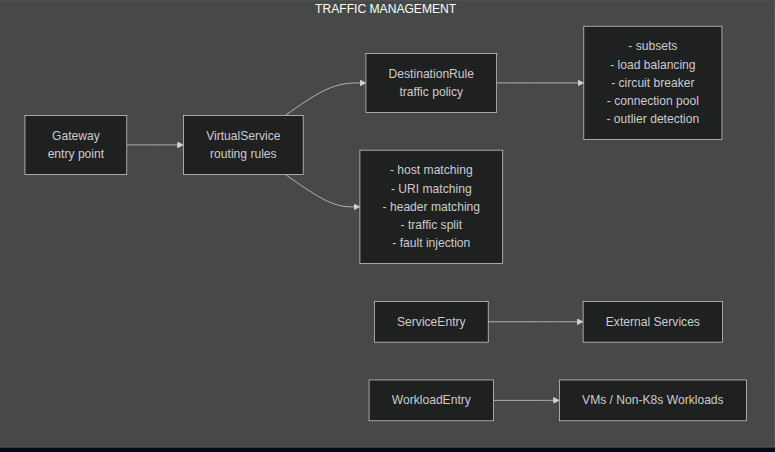
Istio Resource Quick Reference
Traffic Management
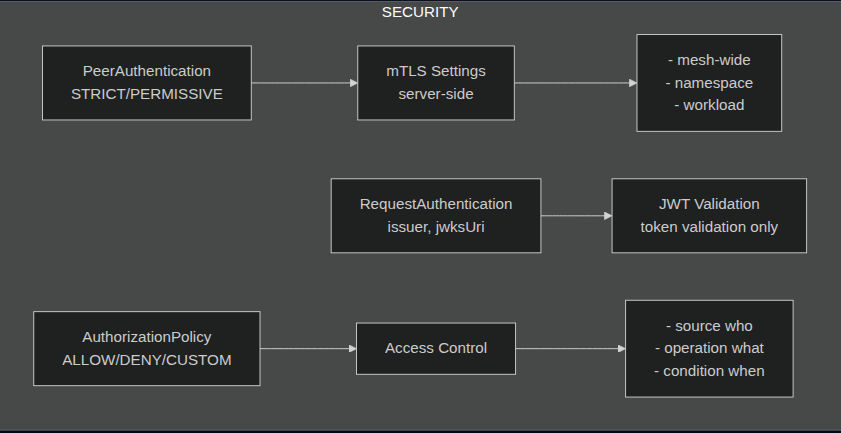
Security
Troubleshooting
Istio Resources Cheat Sheet
Traffic Management
| Kind | Purpose |
|---|---|
| VirtualService | WHERE - routing rules (host, path, headers → destination, retry, timeout, fault injection) |
| DestinationRule | HOW - policies after routing (subsets, LB algorithm, circuit breaker, connection pool, TLS) |
| Gateway | Entry/exit point for mesh (ingress/egress), define listeners + TLS |
| ServiceEntry | Register external service into mesh registry |
| WorkloadEntry | Register non-K8s workload (VM) into mesh |
| WorkloadGroup | Template for WorkloadEntry (like Deployment for Pod) |
| Sidecar | Config sidecar scope (limit egress hosts, reduce memory) |
| ProxyConfig | Tune Envoy proxy settings (concurrency, tracing) |
Security
| Kind | Purpose |
|---|---|
| PeerAuthentication | Server-side mTLS policy (STRICT/PERMISSIVE/DISABLE) |
| RequestAuthentication | JWT validation (issuer, jwksUri, audiences) |
| AuthorizationPolicy | Access control (ALLOW/DENY/CUSTOM based on source, operation, conditions) |
Key Combos
This is pretty useful for you to remember what is used together and what is the reason to use.
| Use Case | Resources | Explanation |
|---|---|---|
| Ingress | Gateway + VirtualService |
Receive traffic from the internet and route it to internal services. |
| Egress | ServiceEntry + Gateway + VirtualService |
Route traffic going out of the mesh through a dedicated Egress Gateway for security/auditing. |
| mTLS enforce | PeerAuthentication |
Encrypt communication between pods and enforce Mutual TLS (Strict/Permissive). |
| JWT required | RequestAuthentication + AuthorizationPolicy |
Validate JSON Web Tokens (JWT) and enforce access control based on token claims. |
| Traffic splitting | VirtualService + DestinationRule (subsets) |
Manage Canary Deployments or A/B testing by splitting traffic between subsets (v1/v2). |
| External VM | WorkloadEntry + ServiceEntry |
Integrate non-Kubernetes workloads (VMs/Bare-metal) into the mesh as if they were pods. |
| Resilience | VirtualService + DestinationRule |
Configure Circuit Breakers, Retries, Timeouts, and Outlier Detection to handle failures. |
| L7 Authz | AuthorizationPolicy | Enforce fine-grained Access Control (e.g., allow Service A to call GET on Service B but deny POST). |
Istio CLI Cheat Sheet
Domain: Troubleshooting
Essential istioctl commands for the exam.
Debug & Logging:
# Enable debug logging on proxy
istioctl proxy-config log <pod-name> --level debug

# Enable specific component logging
istioctl proxy-config log <pod-name> --level connection:debug,http:debug

# View Envoy access logs (in pod)
kubectl logs <pod-name> -c istio-proxy -f

# Describe proxy (detailed info)
istioctl experimental describe pod <pod-name>
Injection & Labeling: Be sure to remember and understand this for exam plz!
# Check if namespace has auto-injection enabled
kubectl get namespace -L istio-injection

# Enable auto-injection
kubectl label namespace <ns> istio-injection=enabled

# Disable auto-injection
kubectl label namespace <ns> istio-injection-

# Manual injection
istioctl kube-inject -f deployment.yaml | kubectl apply -f -

# Check injection status
istioctl experimental check-inject -n <namespace>
Common Troubleshooting Scenarios:
| Symptom | Command | What to Check |
|---|---|---|
| 503 errors | istioctl proxy-config clusters |
Cluster health, endpoints |
| Routing not working | istioctl proxy-config routes |
VirtualService applied correctly |
| Config not applied | istioctl analyze |
Configuration errors |
| Still like above but with namespace xD | istioctl analyze -n default-namespace |
Configuration errors |
| Sidecar not injected | kubectl get pod -o yaml |
Injection labels |
After applying the manifest every time, I would run istioctl analyze to check if there were any issues.
References:
Dashboards (Quick Access to Observability UIs)
| Command | Purpose |
|---|---|
istioctl dashboard kiali |
Open Kiali (service graph, mesh observability) |
istioctl dashboard grafana |
Open Grafana (metrics dashboards) |
istioctl dashboard jaeger |
Open Jaeger (distributed tracing) |
istioctl dashboard envoy <pod> |
Open Envoy admin UI for specific pod |
Upgrade & Uninstall
| Command | Purpose |
|---|---|
istioctl upgrade |
In-place upgrade Istio to new version |
istioctl install --set revision=<rev> |
Canary upgrade with revision label (e.g., 1-20-0) |
istioctl uninstall --revision <rev> |
Remove specific revision |
istioctl uninstall --purge |
Complete removal of Istio |
Key Resources
Comparison: Istio vs Haproxy
If we are simply using Istio for request routing, it would be called over-engineering. So, when to use Istio:
- Fault Injection: Simulate 503 or delay 5s to test the app's fault tolerance
- Circuit Breaking: Auto-disconnect traffic to fucked Pod to prevent domino?
- Mirroring: Fire and forget traffic to the beta version without affecting the live version!
Exam Notes
Don't be like me, I was thinking this exam was a quiz choice, not hands-on. And then you know what happens, I failed 1st time. My mistake was that I didn't check the exam before scheduling xD. But luckily Linux Foundation gives 1 free retry.
After taking exam
I don't think it is that hard to pass the exam, but I will not make any excuses for my 1st fail xD (It is just my bad didn't take a look properly!)
The only question I didn't make is a question related to Virtual Service, but with port redirection. I think I need an extra 10 minutes for that question T_T
And the last thing, for any configuration issue or after every apply, run command: istioctl analyze -n namespace, it will help you a lot for saving time xD
I scored 81/100
Where to practice
Killercoda fore sure!
- Recommended: ICA Certification | Killercoda
- Istio | Killercoda
- Recommended: Killercoda Interactive Environments
- Recommended, this covers 70% exam scope: Istioworkshop.github.io
- Free resource for learning: Tetrate
Practice Istio Installation
Scenario: Install Istio version 1.21.0 on a Kubernetes cluster using istioctl. Requirements:
- Download Istio version 1.21.0
- Install Istio using
demoprofile - Enable sidecar injection for
productionnamespace - Deploy a test application httpbin in
productionnamespace - Verify Istio installation and sidecar injection
# Step 1: Download Istio 1.21.0
curl -L https://istio.io/downloadIstio | ISTIO_VERSION=1.21.0 sh -

# Step 2: Add istioctl to PATH
export PATH=$PWD/istio-1.21.0/bin:$PATH

# Step 3: Verify istioctl
istioctl version --remote=false

# Step 4: Install Istio with demo profile
istioctl install --set profile=demo -y

# Step 5: Verify installation
istioctl verify-install
kubectl get pods -n istio-system

# Step 6: Create and label production namespace
kubectl create namespace production
kubectl label namespace production istio-injection=enabled

# Step 7: Deploy test app
kubectl apply -f istio-1.21.0/samples/sleep/sleep.yaml -n production

# Step 8: Verify sidecar injection (2/2 containers)
kubectl get pods -n production
# Expected: sleep-xxx  2/2  Running
Practice Canary Upgrade Istio
Scenario: Upgrade Istio from 1.21.0 to 1.22.0 using canary method.
Pre-requisites: Lab 1 completed (Istio 1.21.0 running)
Requirements:
- Download Istio version
1.22.0 - Install new control plane with revision
1-22-0usingdemoprofile - Migrate
productionnamespace to new revision - Restart workloads and verify sync status
- Uninstall old control plane
# Step 1: Download Istio 1.22.0
curl -L https://istio.io/downloadIstio | ISTIO_VERSION=1.22.0 sh -
export PATH=$PWD/istio-1.22.0/bin:$PATH

# Step 2: Install new control plane with revision
istioctl install --set revision=1-22-0 --set profile=demo -y

# Step 3: Verify 2 istiod running
kubectl get pods -n istio-system -l app=istiod
# Expected: istiod-xxxxx (old) + istiod-1-22-0-xxxxx (new)

# Step 4: Relabel production namespace
kubectl label namespace production istio-injection-
kubectl label namespace production istio.io/rev=1-22-0

# Step 5: Restart workloads
kubectl rollout restart deployment -n production

# Step 6: Verify proxies sync with new control plane
istioctl proxy-status
# Expected: All showing "istiod-1-22-0"

# Step 7: Uninstall old control plane
istioctl uninstall --revision default -y

# Step 8: Final verification
kubectl get pods -n istio-system -l app=istiod
# Expected: only 1 istiod-1-22-0 xD
kubectl get pods -n istio-system
istioctl version
Remember to uninstall it to retest xD: istioctl uninstall --purge -y && rm -rf istio-1.2*
Document page for the exam: https://istio.io/latest/docs/setup/upgrade/canary/