Introduction
I start the progress by using Stephane Maarek's course
Some shortcut I will used in this article
- Placement Groups (PG)
- CloudWatch (CW)
- Auto Scaling Group (ASG)
- Relational Database Service (RDS)
Section 1: EC2 for CloudOps
Placement Groups
When I'm see this, i asociation with HDFS default replication (factor=3).
- Replica 1: Place in node is writing.
- Replica 2: Place in node that have different rack than replica 1.
- Replica 3: Place in same rack with replica 2 but different node.
So let's make a simple compare with AWS PG
| HDFS | EC2 PG |
|---|---|
| Same rack | Cluster PG (low latency, high throughput) - single AZ only |
| Different rack | Spread PG (isolate failure, spread EC2 instances to multiple zones) |
| Custom rack topology | Partition PG (each partition = 1 logic rack) |
Ok, why PG?
- Pros: Great network with high throughput, low latency (10Gbps between instances with Enhanced Networking enable).
- Cons: If the AZ fails, all instances fails at the same time. PG spread have limited to 7 instances per AZ per PG. For PG paritions, we can have up to 7 partitions per AZ and can be span across multiple AZs in the same region.
CloudWatch for EC2
AWS provided metrics (AWS push them for us) includes CPU,Network,Disk and Status check metric every 5 minutes with no agent needed. (paid version or Detailed Monitoring will be 1 minute interval). Good thing to know that defaults metrics are collected by AWS hypervisor from outside of instance?
Custom metric: Hmm, RAM is a custom metric? (I thought it should be default...), make sure IAM permissions on the EC2 instance role are correct.
Yeah, RAM is not fucking included into the AWS EC2 metrics.
If you have 3 or fewer dashboards using only standard EC2 metrics, it's completely free. If you have a 4th dashboard, it's $3/month.
How CW collect metrics and logs from EC2 instance? --> U nified CW Agent (with right permissions).
Unified CW Agent - procstat Plugin will come to exam:
- Collect metrics and monitor system utilization of individual process (support both Linux/Window)
- Select which process to monitor by pid_file/process name/pattern... This shit is free in CheckMK
- Metrics collected by procstat plugin begins with "procstat" prefix.
Conclusion: CW agent not only push metrics, it also able to push logs to CW. Detailed Monitoring won't help you get RAM, it just gives you faster intervals on the same limited set of metrics.
EC2 Instance Connect Endpoint
Useful when no fucking bastion, public IP on the instance or EC2 instances running in a private subnet in a VPC without Internet Gateway or NAT Gateway.
Status Check
So for common we have 3 status check: failed system (host hardware), failed instance (our instance) and attached EBS.
With CW Metrics and Recovery
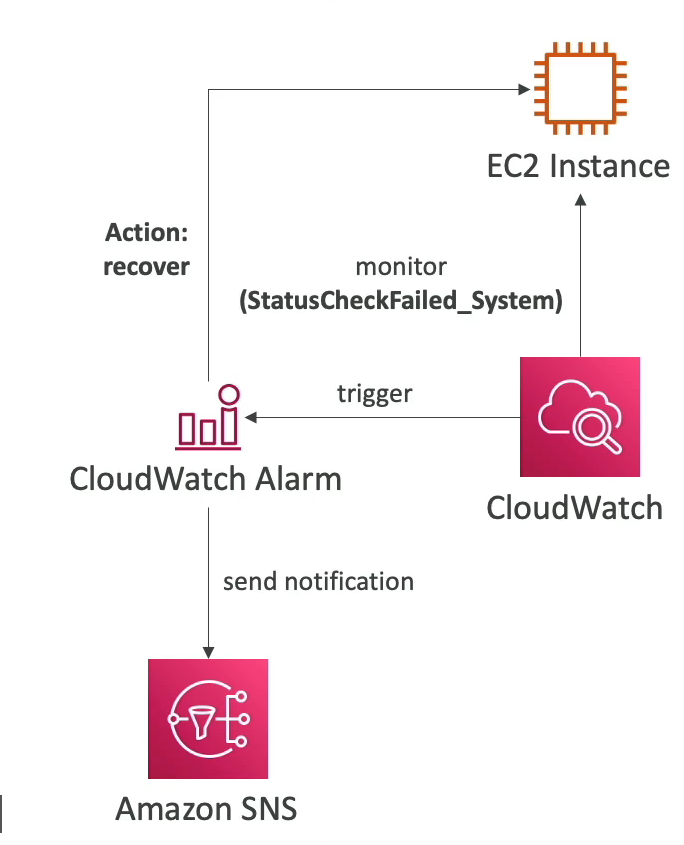
- Option 1: CW Alarm, recover/restart EC2 instance on metric trigger (if StatusCheckFailed_System == 1 for example). Then send notification using SNS.
- Option 2: ASG, yeah launch new instance replaced failed instance...
So after we config CW Alarm, we can test it by using CLI:
aws cloudwatch set-alarm-state --alarm-name name-here-bro --state-value ALARM --state-reason "testing how recover in action after alarm triggered"
Also worth to mention action in CW Alarm:
- Recover: moves the instance to new physical host hardware (AWS migrates it), then starts it up.
- Reboot: restarts the OS on the same physical host (For example: StatusCheckFailed_Instance, action will be reboot)
EC2 Hibernate
Short: keep in-memory state in EBS volume, next time you start EC2 instance, you will load exactly state of your instance before hibernate and shutdown.
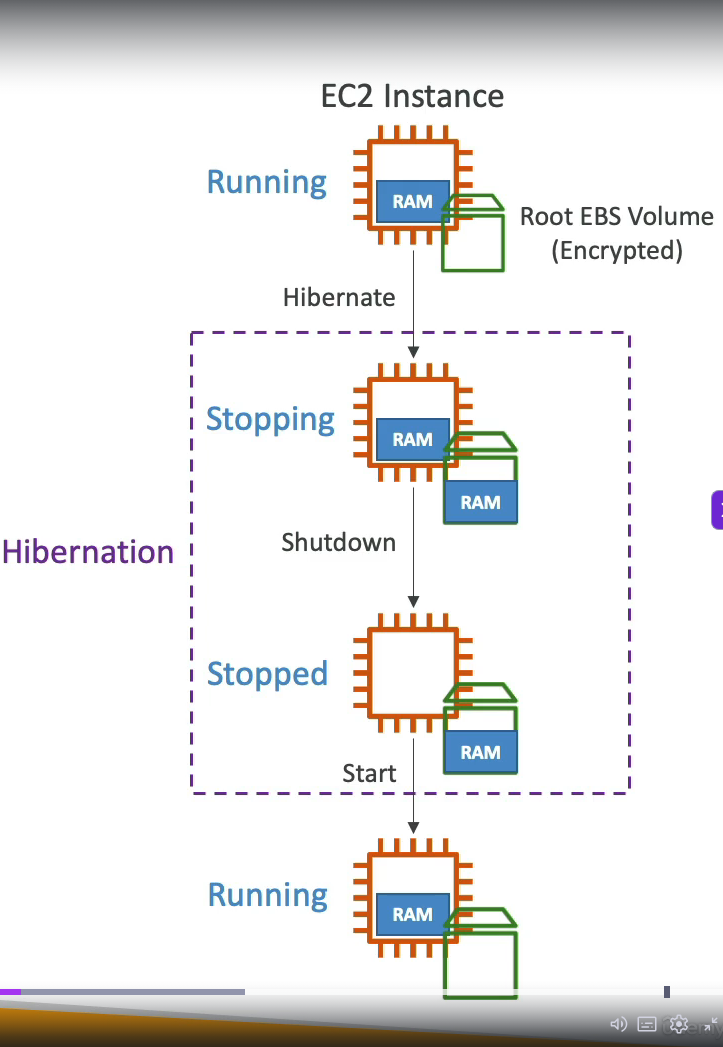
We need to enable it when launch ec2 instance, root volume must have enough size to store hibernate data and root volume must be set to encrypted.
- Instance RAM must be less than 150 GB
- Cannot hibernate for more than 60 days
- Not all instance types support hibernate (exam may test this)
- These 3 limits are commonly tested in SOA-C03
Instance Scheduler on AWS
Yeah, that is how we save every bucks when running in Cloud. Features:
- Supports EC2 instances, EC2 ASG and RDS instances.
- Schedules are managed in a DynamoDB table.
- Stop/Start instance by using resource's tag and Lambda.
- Works in cross-account and cross-region resources.
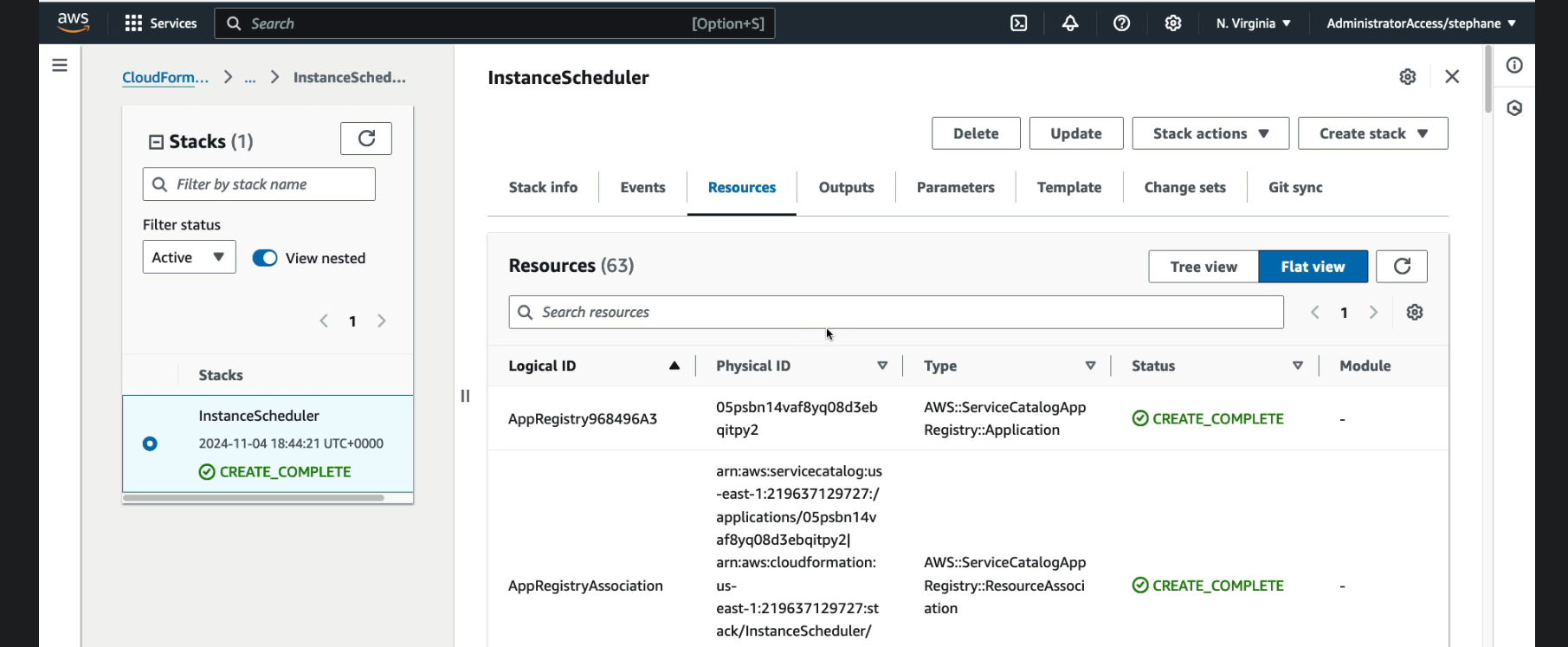
We have to create instance scheduler via Cloudformation --> Stack --> create stack or use exists template to create this fucking stack. After created that we have a lot of resources created