TLDR: Slurm is an open source, fault-tolerant, and highly scalable cluster management and job scheduling system for large and small Linux clusters.
Phase 1: Understanding the Core Concepts of Slurm (Most Important)
First, understand the basic topology:
User
  |
Login Node
  |
slurmctld (controller)
  |
+------------+------------+
|            |            |
slurmd      slurmd      slurmd
Node01      Node02      Node03
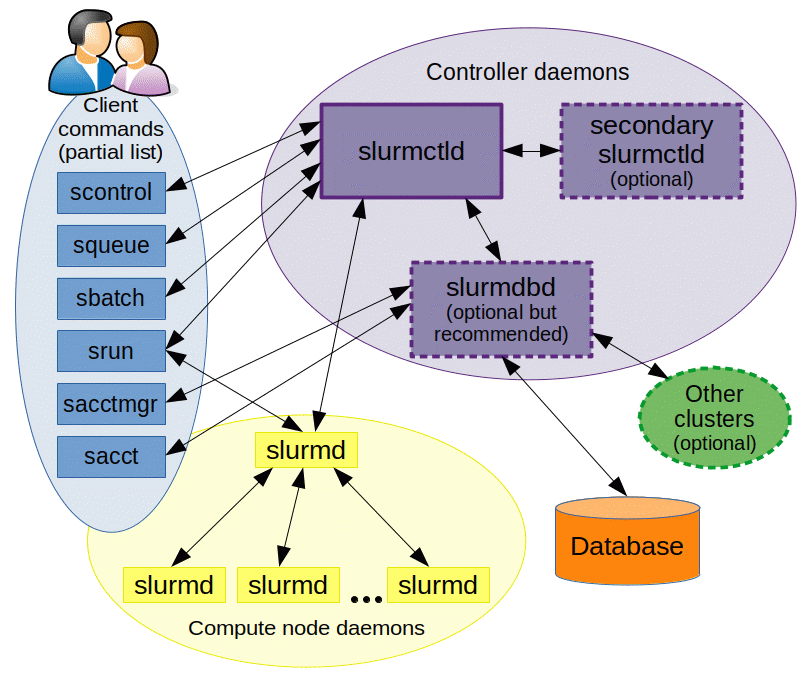
Key Components:
| Component | Role |
|---|---|
slurmctld |
Scheduler + Central Controller |
slurmd |
Agent daemon running on compute nodes |
slurmdbd |
Accounting daemon (Slurm Database Daemon) |
munge |
Authentication service |
login node |
Gateway node where users SSH in to submit jobs |
Mapping Concepts: Slurm vs Kubernetes
K8s                    Slurm

kube-apiserver   ~=    slurmctld
kubelet          ~=    slurmd
Node             ~=    Compute Node
Pod              ~=    Job/Task
Scheduler        ~=    Slurm Scheduler
Key fundamental differences:
- Kubernetes is optimized for long-running services (Deployments, APIs, web apps).
- Slurm is optimized for batch workloads (AI training, simulations, HPC jobs).
For example:
- K8s: "I want to run an Nginx service indefinitely."
- Slurm: "I want to run a 48-hour model training job and exit when done."
Why not just use K8s Jobs for Distributed AI Training?
While Kubernetes has Job objects, Slurm remains the gold standard for large-scale GPU training because of three core HPC capabilities built into its DNA:
Atomic Multi-Node Allocation (Native Co-Allocation):
- Multi-node distributed training (PyTorch DDP / FSDP / Megatron-LM) requires all $N$ GPUs across multiple nodes to start simultaneously to establish rendezvous and synchronize gradients.
- In vanilla Kubernetes, the default scheduler binds pods incrementally. If 60 GPUs are free and 4 are busy, it might schedule 60 pods and leave them idling—wasting expensive GPU hours unless using external batch co-scheduling add-ons like Kueue or Volcano.
- Slurm natively guarantees atomic allocation: a job is only launched when 100% of the requested nodes and resources are simultaneously available, remaining in
PENDINGstate without holding or fragmenting resources. (Note: In Slurm documentation, "Gang Scheduling" specifically refers to time-slicing oversubscribed resources between jobs, rather than co-allocation).
Network Topology Awareness (InfiniBand / RoCE Tree):
- The biggest bottleneck in AI training is inter-GPU communication (NCCL AllReduce latency).
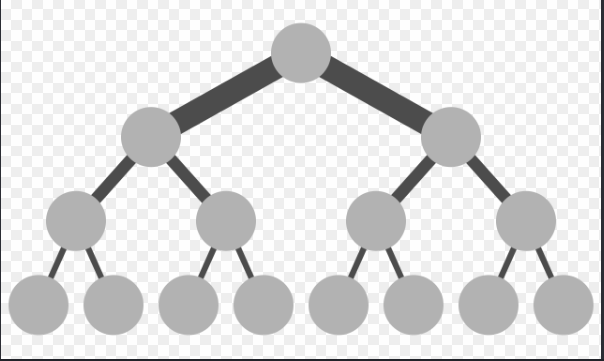
- Slurm understands network switch hierarchy via Topology Plugins (Spine-Leaf / Fat-Tree). It prioritizes packing jobs within the same Top-of-Rack (ToR) switch to maximize throughput and minimize latency.
Bare-Metal Performance & Direct POSIX Storage:
- Slurm executes processes directly on the host OS with Linux cgroups locking specific CPU cores, NUMA nodes, and GPU PCI buses.
- Zero container overlay network (CNI) overhead and direct POSIX access to high-performance parallel file systems (Lustre, BeeGFS, GPFS / IBM Storage Scale).
Essential CLI Commands:
sbatch: Submits a batch job script. Slurm accepts the job and initially places it in a PENDING state:
JobID=123
State=PENDING
It then waits for the scheduler to allocate resources and execute it. In Kubernetes terms, it feels like:
kubectl apply -f job.yaml
srun: Executes jobs immediately in interactive mode or runs parallel tasks within an allocation. For example:
srun hostname
Slurm allocates a node and executes the command on node01. A quick way to distinguish them:
sbatch = Submit a job script (asynchronous)

srun   = Run a command / step (synchronous / interactive)
squeue: Views the cluster's job queue. Running squeue:
JOBID PARTITION USER ST
123   gpu       kien PD
124   gpu       kien R
State meanings:
PD = Pending
R  = Running
CG = Completing
Conceptually similar to: kubectl get pods
sinfo: Views the status of nodes and partitions. Running sinfo:
PARTITION AVAIL NODES STATE
cpu       up      4   idle
gpu       up      2   alloc
Think of it like:
kubectl get nodes
scancel: Cancels/kills a job. For example: scancel 123. Similar to: kubectl delete pod xxx.
sacct: Accounting tool. Displays historical job accounting records.
Core Resource & Scheduling Concepts
- QoS (Quality of Service): Priority, limits, and preemption rules.
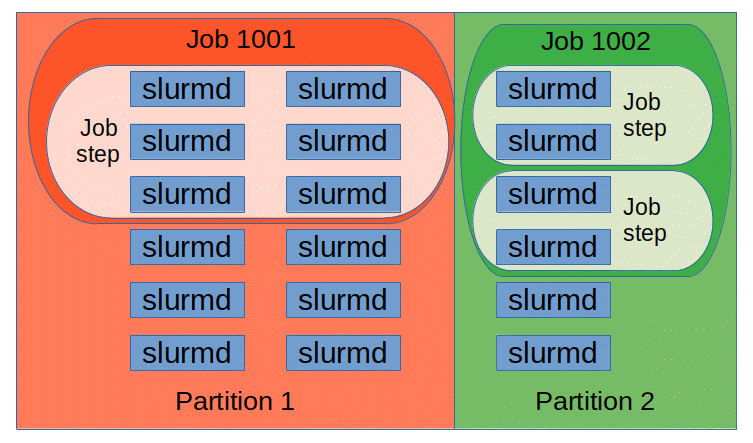
- Partition: Logical grouping of nodes (like queues or namespaces with specific node pools).
- GRES (Generic Resources): Generic resource management (e.g. GPUs).
- cgroup: Resource isolation (CPU cores, memory, devices) enforced on compute nodes.
Phase 2: Localhost Lab with Docker
Building a Mini Cluster
docker network create slurm-net

controller
compute01
compute02
Each container acts as a specific role:
slurm-controller
slurm-node1
slurm-node2
Architecture:
+------------------+
|    slurmctld     |
+------------------+
         |
    +----+----+
    |         |
+--------+ +--------+
| slurmd | | slurmd |
| node01 | | node02 |
+--------+ +--------+
Hands-on Testing
This is the most valuable part to practice:
sbatch job.shsrun hostnamesinfosqueue
Phase 3: Simulating a Production Cluster
Once the basic Docker cluster is up and running:
Adding a Login Node:
login
controller
compute01
compute02
The login node doesn't run computation workloads:
User workflow:
ssh login
sbatch train.sh
This mirrors real-world production environments much closer.
Adding slurmdbd (Accounting)
Learn accounting — this is one of the most frequently used subsystems by HPC admins.
MariaDB
  |
slurmdbd
  |
slurmctld
Then explore these commands:
Phase 4: GPU Scheduling
Note: GPU scheduling (GRES) can be skipped initially if you don't have local GPUs.
- Slurm manages GPU via GRES (Generic Resources) combined with Linux cgroups to map device files (
/dev/nvidia*). - Tip for learners without a local GPU like me, we still can define dummy GRES in
slurm.confandgres.confto completely understand the resource request flow of--gres=gpu:1in Slurm without any physical GPU!
# slurm.conf
GresTypes=gpu
NodeName=node[1-2] Gres=gpu:fake:2

# gres.conf
NodeName=node[1-2] Name=gpu Type=fake File=/dev/null
Phase 5: High Availability (HA) & Production Setup
When scaling up to a larger lab:
Controller HA
Learn Slurm High Availability (HA):
Primary slurmctld
Backup slurmctld
Configuration concepts in slurm.conf:
SlurmctldHost=ctrl1
SlurmctldHost=ctrl2
Shared Storage Strategy
While not a hardcoded Slurm specification, the standard industry convention in HPC/AI clusters is to tier shared storage into 3 distinct mount paths based on I/O performance and lifecycle:
/home(User Environment):- Holds dotfiles, Python virtualenvs, and job submission scripts.
- Backed by standard NFS / CephFS with daily backups and strict quotas (e.g., 20GB/user).
/scratch(High-Speed Ephemeral Workspace):- Dedicated for active job I/O, temporary checkpoints (
.pt), and staging datasets. - Backed by high-throughput Parallel File Systems (Lustre, BeeGFS). No backups and subject to auto-purging policies (e.g., automatically deleted if unaccessed for 30 days).
/projector/data(Team Shared Assets):- Shared storage for base datasets (e.g., ImageNet, HuggingFace caches) and long-term project artifacts with team-based POSIX permissions (
setgid).
Phase 6: Slurm + Containers
This is where the real fun begins:
Why don't we just use docker run in Slurm?
- The essence: Docker requires a daemon running with root access. In multi-tenant HPC clusters, giving docker access to users is practically equivalent to giving them root access xD.
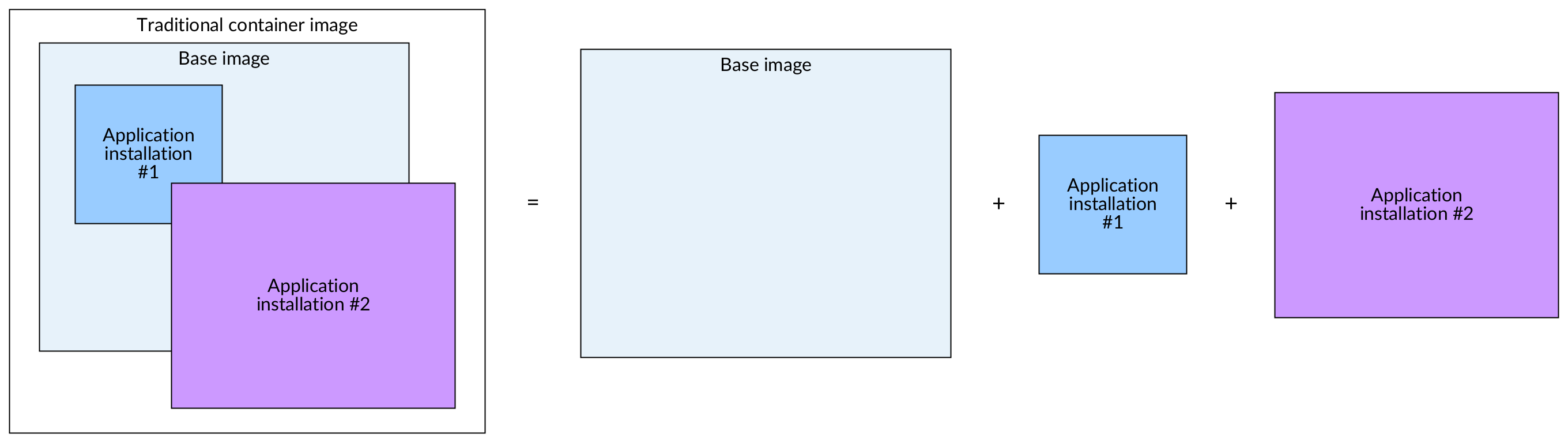
- Solution for HPC: Apptainer (Singularity) or NVIDIA Enroot / Pyxis that turn container images into flat files (
.sif), run completely under the user's UID/GID within a user namespace, and mount/scratchand host NVIDIA drivers directly without a root daemon.
Apptainer (Singularity)
Extremely popular in HPC environments. Apptainer is well worth learning before Docker-on-Slurm, as almost every HPC cluster uses it for rootless container execution.
srun apptainer exec pytorch.sif python train.py
Phase 7: Slurm + Kubernetes
This is the most sensible model in modern AI/ML infrastructure today. For example:
K8S Layer (Cloud-native control plane)
Serving developer experience: - JupyterHub - MLflow - Ray / Ray Dashboard - Model Registry - Serving APIs / Inference Servers (vLLM / Triton Inference Server)
Slurm Layer (Bare-metal Execution Engine)
Serving heavy distributed training & fine-tuning where thousands of GPUs connect to each other via InfiniBand or RoCEv2.