Intro
I thought I understood ArgoCD well enough in the past I ran ArgoCD with multiple K8s clusters inside it (>10 clusters), and had around 500-600 ArgoCD applications in a single cluster. But I was a contributor there, not the one who built it from scratch, and it turns out I had 100% misconceptions that I often ran into. Even though I had the Certified Argo Project Associate (CAPA), it was a joke for me, no fucking value gained! So that is the reason this article was born to help me understand the "basic" knowledge of ArgoCD. LOL
Ok, we will go through the sections below in this article:
- Architecture & Reconciliation loop
- Application - atomic unit
- Cluster registration
- AppProject - governance layer
- ApplicationSet - factory pattern
- Sync mechanics deep dive
- RBAC 3 layers
- Operational gotchas
- Recap - mental model
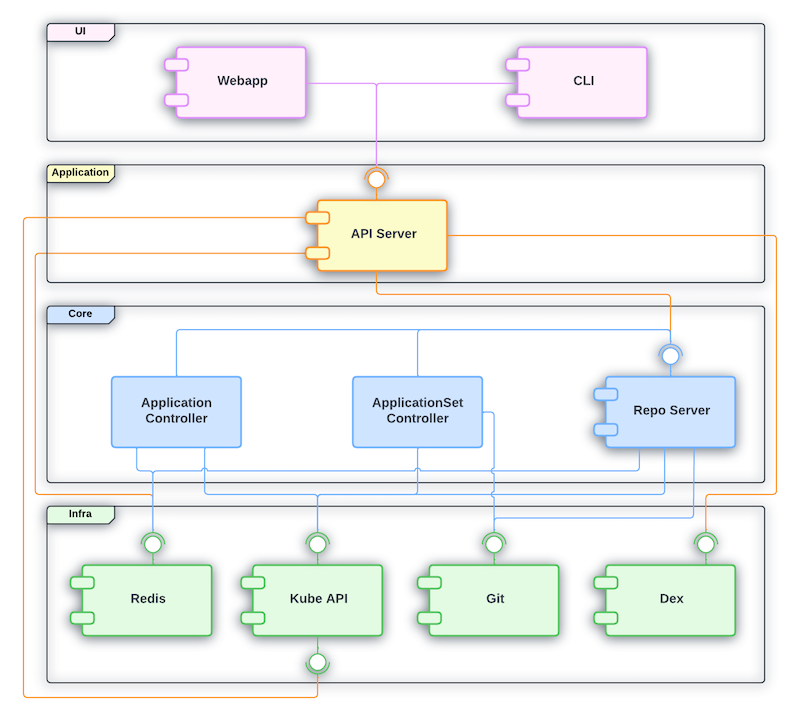
Architecture & Reconciliation loop
- Static View: what the fuck the components are
- Dynamic View: how the fuck they are looping
ArgoCD is not a fuckin' monolith, it's a fuckin' workload that commonly runs in the argocd namespace.
First I thought ArgoCD's watch mechanism was the same as K8s's watch mechanism, but it turns out there's a little difference, let's figure it out!
Kubernetes Controller Manager: Real-time Watch (Event-Driven)
In K8s, Controllers (like the ReplicaSet Controller, Deployment Controller) set up an HTTP Long-Polling watch mechanism to the Kube-ApiServer. For example:
- Desired State: state stored in ETCD ( for example "replicas: 1")
- Actual State: actual state of the pod in the cluster
- When something changes: the Kube-ApiServer sends an event to let the Controller Manager know. The Controller Manager sees actual pod replicas = 0, but desired = 1, so it makes a request to the Kube-ApiServer to create pod replicas that match the desired state. That is why when we delete a pod in a deployment with 1 replica, it automatically brings up a new pod!
Conclusion: K8s works in an event-driven way — if an event appears, it reacts and makes the change.
Difference between ArgoCD and Kubernetes
| Property | K8s Controller Manager | ArgoCD (Application Controller) |
|---|---|---|
| Source keep desired state | etcd | Git repository (outside of cluster) |
| How to recognize changes | Watch API (Real-time events) from Kube-ApiServer | Polling periodically to check Git or webhook |
| Main quest | Make sure resources run in the desired state which is stored in etcd | Make sure actual/live cluster state matches the desired state (Git) |
Overview when combining ArgoCD + K8s
Actually when we use GitOps (ArgoCD + K8s), we're using a double reconciliation loop:
- First loop (ArgoCD): compare Git (desired) <--> K8s object spec read via kube-apiserver (this is
actualfrom ArgoCD's view — but it's also exactly what feeds into loop 2 below asdesired). If Gitops repo changes, or someone drifts the live spec away from Git (and selfHeal: true is set), ArgoCD re-applies via kube-apiserver to overwrite the drift back to match Git. - Second loop (Kubernetes, independent of ArgoCD): compare K8s object spec in etcd (desired at this layer) <--> actual runtime state (is the pod really running as spec says?). If the pod dies, K8s controllers recreate it to match spec.
- When someone uses
kubectl delete pod, K8s controllers will recreate that pod (ofc, I'm talking about Deployment/ReplicaSet, not a fucking standalone pod) - If someone uses
kubectl edit deploymentto change a resource/spec, ArgoCD will notice and change it back to match the data in Git (if selfHeal: true)
Application - atomic unit
Application vs ApplicationSet
- Application: a CRD (Custom Resource Definition) that describes 1 source (repo + path/chart + revision) mapped to a destination (cluster + namespace). It's handled by application-controller's reconcile and sync loop.
apiVersion: argoproj.io/v1alpha1
kind: Application
metadata:
  name: guestbook-app
  namespace: argocd     # Must match the namespace where Argo CD is installed
  finalizers:
    - resources-finalizer.argocd.argoproj.io # Enables cascading delete (deletes K8s resources when the app is deleted)
spec:
  project: default       # The Argo CD project this app belongs to
  # 1. Source: Where your Kubernetes manifests live
  source:
    repoURL: 'https://github.com/argoproj/argocd-example-apps.git' # Git or Helm repo URL
    targetRevision: HEAD # Git branch, tag, or commit hash
    path: guestbook      # Directory inside the repository containing the YAMLs

  # 2. Destination: Where to deploy the resources
  destination:
    server: 'https://kubernetes.default.svc' # Cluster API URL (this refers to the local cluster). We could define to other cluster if we have.
    namespace: guestbook                     # Target namespace in your cluster

  # 3. Sync Policy: How Argo CD handles configuration drift
  syncPolicy:
    automated:
      prune: true     # Automatically delete resources no longer present in Git
      selfHeal: true  # Automatically fix deviations if someone manually edits live cluster resources
    syncOptions:
      - CreateNamespace=true # Create the target namespace automatically if it doesn't exist
      - ApplyOutOfSyncOnly=true # Only sync components that have drifted to optimize performance
- ApplicationSet: a controller that runs separately (known as the
argocd-applicationset-controllerpod in the argocd namespace). Its job is to generate multiple Applications from 1 template + generator(s), it doesn't do the sync job itself, it just creates/updates/deletes the Application resource, then application-controller does that part.
apiVersion: argoproj.io/v1alpha1
kind: ApplicationSet
metadata:
  name: guestbook
  namespace: argocd        # Must match the namespace where Argo CD is installed
spec:
  goTemplate: true          # Enables Go template syntax ({{.path.basename}}) used in `template:` below
  goTemplateOptions: ["missingkey=error"] # Fail render instead of silently rendering empty if a field is missing
  # 1. Generators: how ApplicationSet discovers "what Applications should exist"
  generators:
    - git:
        repoURL: https://github.com/argoproj/argocd-example-apps.git # Same repo concept as a normal Application source
        revision: HEAD
        directories:
          - path: apps/*    # Glob pattern — each matching folder becomes 1 generated Application

  # 2. Template: how each matched folder gets turned into an actual Application
  template:
    metadata:
      name: '{{.path.basename}}'   # e.g. folder "apps/guestbook" -> Application name "guestbook"
    spec:
      project: default
      source:
        repoURL: https://github.com/argoproj/argocd-example-apps.git
        targetRevision: HEAD
        path: '{{.path.path}}'     # Full matched path, e.g. "apps/guestbook"
      destination:
        server: https://kubernetes.default.svc
        namespace: '{{.path.basename}}'  # Deploy each generated app into its own namespace or in same namespace, your choice.
      syncPolicy:
        automated:
          prune: true
          selfHeal: true
I think at this point, it sill hard for you, no worry I will make hands on below!
Flow between ApplicationSet and Application in ArgoCD
So basically, the flow in order from ApplicationSet to Application:
- Update the value file of ApplicationSet, or add a new folder in the Gitops repo (generator source changes) — applicationset-controller learns about the changes via periodic requeue (polling interval) or webhook.
- ApplicationSet runs a generator (for example git-dir), asking argocd-repo-server for help to checkout the repo and list folders that match the pattern.
- argocd-repo-server will checkout git, list the folders/files that match the pattern, then return a raw parameter list to applicationset-controller. After that, applicationset-controller renders the templates with those parameters, feeding into
template:— we call this the wanted, or expected, Application. - Then applicationset-controller compares the expected Application vs the current Application; if there's a diff, it modifies/updates the current Application.
- After that, the current Application gets compared against live-state — the result is the Sync/OutOfSync status you often see.
Cluster Registration
So basically, for cluster registration in ArgoCD, application-controller calls the endpoint of the kube-apiserver of the destination cluster (the same idea as kubectl --context X).
The destination cluster credential is saved as a Secret in the argocd namespace of the cluster hosting ArgoCD. It must have the label argocd.argoproj.io/secret-type: cluster.
Fields:
name: display name, used as destination.nameserver: endpointconfig: JSON of bearerToken, tlsClientConfig/exec-based
application-controller reads the secret via a separate informer/watch — it doesn't go through the manifest-render pipeline (repo-server) like a normal Application does.
Mostly we use argocd-vault-plugin for the secret — we only store the path that defines where the secret is saved in Vault.
The Application delivering the Secret must target destination.name: in-cluster, which is the built-in cluster, meaning the cluster hosting ArgoCD. This Secret needs to be stored in the local argocd namespace, not the destination cluster!
Provisioning the actual credential (ServiceAccount + ClusterRole + Binding + mint token) on the destination cluster is a separate concern — ArgoCD itself doesn't do this:
- CLI flow (
argocd cluster add): the CLI (using your own local kubeconfig with admin access) bootstraps SA + ClusterRole + ClusterRoleBinding on the destination cluster, as a one-time setup. The default ClusterRole (argocd-manager-role) is near cluster-admin (*/*/*) unless scoped down manually. - Declarative/GitOps flow (what we do): this provisioning has to happen outside ArgoCD (Terraform/other pipeline) against the destination cluster; only the resulting token gets pushed to Vault for AVP to inject.
The cluster only actually shows up in ArgoCD (Settings > Clusters, usable as a destination) AFTER the Secret is applied via a real sync — not the moment the Application object gets created. If the sync policy is manual and hasn't run yet, the Application just sits
OutOfSyncand the cluster stays invisible.
AppProject
AppProject is a guardrail of ArgoCD that limits 3 independent axes:
- sourceRepos (which git repo)
- destinations (which cluster + namespace)
- clusterResourceWhitelist/namespaceResourceWhitelist (which K8s resource kind, cluster-scoped vs namespace-scoped)
clusterResourceWhitelist defaults to empty (deny all cluster-scoped resources like ClusterRole/ClusterRoleBinding/CRD/Namespace) unless explicitly whitelisted — this default-deny is what actually gives AppProject teeth.
AppProject is a secondary defense, running concurrently with (not nested inside) the destination cluster's own RBAC:
- First (Real, K8s-enforced): RBAC of the SA/token on the destination cluster. An absolute limit!
- Second (Software, defined and enforced by ArgoCD): only allows requests permitted by clusterResourceWhitelist/namespaceResourceWhitelist, sourceRepos, and destinations — anything outside that gets blocked.
An Application's spec.project must reference an AppProject that already exists — validated right at Application creation time, before it even gets to sync. No AppProject means the Application object fails to even get created, full stop.
argocd-repo-server
It's one of the most important components — it's the only one that talks to git/Helm/OCI registries. It clones/fetches the repo, checks out the right revision, then renders the final manifest end-to-end no matter if the source is a Helm chart, Kustomize, or plain YAML. argocd-repo-server is called by:
- application-controller: each time it needs to diff git vs live-state, it needs to ask repo-server to show the rendered manifest for this source.
- applicationset-controller: each time it runs a git generator, it needs to ask repo-server to list folders/files that match this pattern, plz.
argocd-server (API/UI gateway)
It's the API/UI gateway — it handles every request and enforces RBAC to determine which user/group is allowed to sync/create/delete/overwrite what.